Sign PDF online free — admissible under ESIGN Act + UETA
Sign PDF online free in 30s. ESIGN Act + UETA simple electronic signature, SHA-256 integrity anchor and timestamped audit trail. EU Frankfurt, no Cloud Act exposure.
How it works
Upload your PDF
Drag and drop, paste from clipboard, or import from Google Drive, Dropbox or OneDrive. Works with any PDF up to 100 MB: AcroForms, scanned contracts, NDAs, MSAs, leases, W-9, W-8BEN, IRS…
Place your signature, initials and date
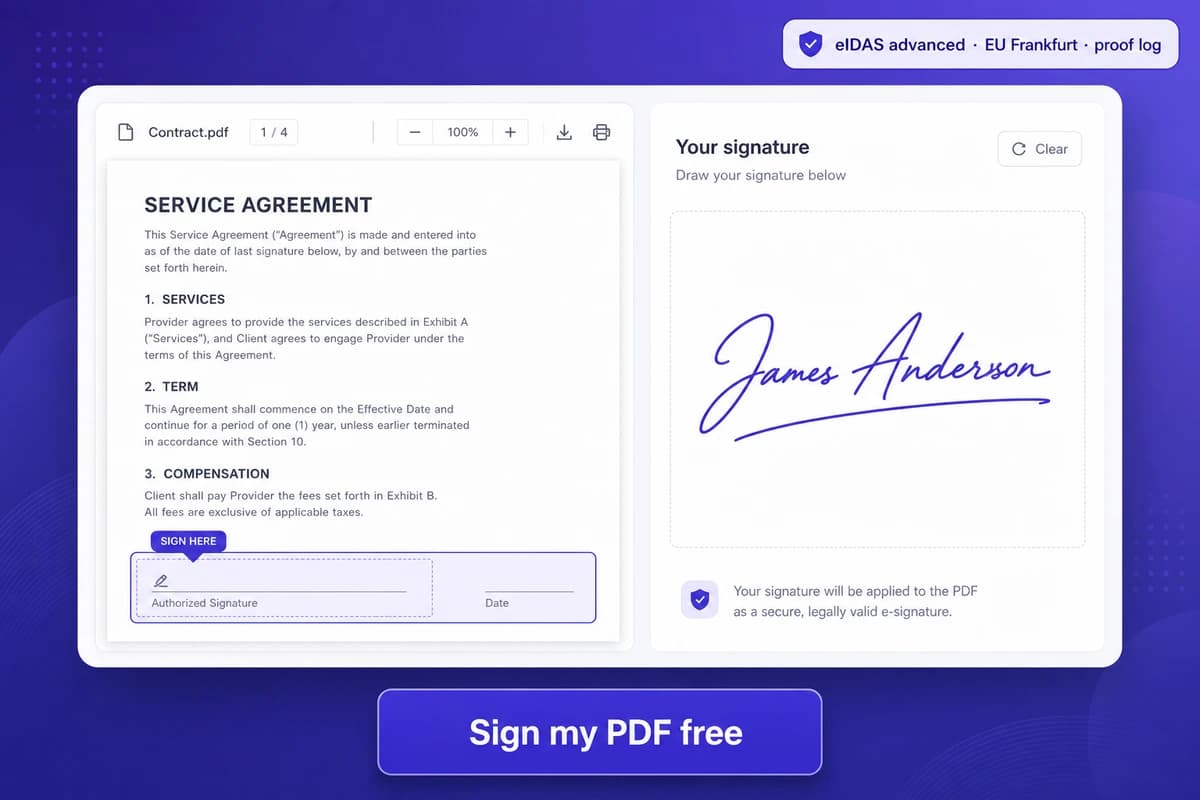
Click anywhere on the document. Draw with mouse, trackpad or finger; type your name in a cursive font; or upload a transparent PNG of your wet-ink signature.…
Download the signed PDF
Get a flattened PDF with the signature drawn into the page — it opens identically in Adobe Reader, Apple Preview, Foxit, Edge and Firefox PDF.js.…
Why choose iFillPDF
ESIGN + UETA + state-by-state coverage (50 states + DC + USVI + PR)
iFillPDF signatures are admissible under the federal ESIGN Act of 2000 (15 USC §7001-§7006), UETA 1999 (adopted in 47 states + DC + USVI + PR), the Illinois Electronic Commerce Security Act 5 ILCS 175 (Illinois never adopted…
What an iFillPDF signature actually is
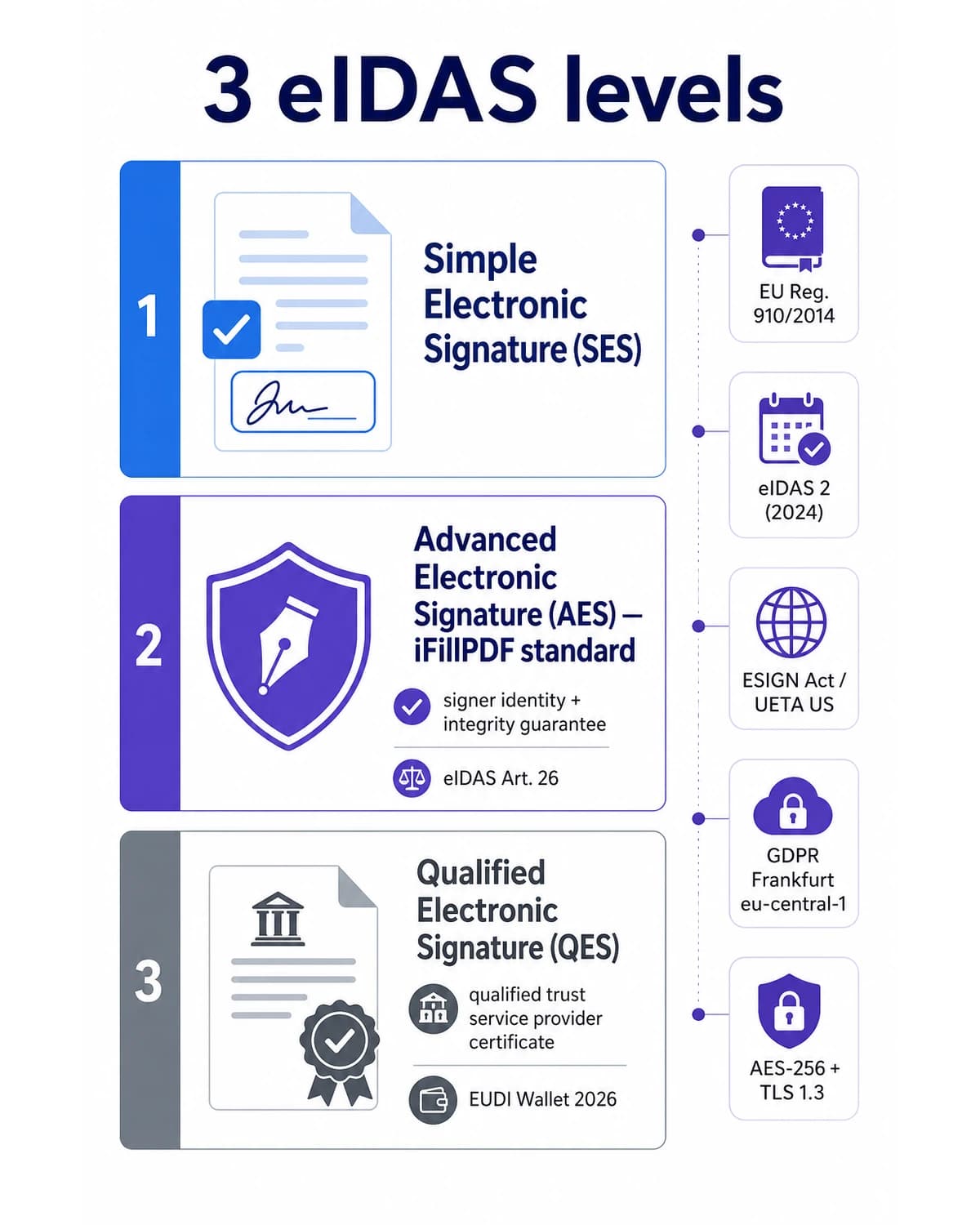
iFillPDF issues a Simple Electronic Signature (SES): your drawn, typed or uploaded signature is rendered into the PDF page, and the document you sent is anchored by a SHA-256 hash of the exact bytes delivered.…
Timestamped audit trail on every document you send out
When you send a PDF for signature, the share record freezes a SHA-256 hash of the exact snapshot delivered to the recipient — so you can prove later, byte for byte, that the document signed is the document you sent.…
EU Frankfurt hosting — outside US Cloud Act + FISA Section 702 reach
Files are stored on Hetzner Falkenstein (Saxony, Germany) and processed in Frankfurt eu-central-1 — under EU TADPF (Trans-Atlantic Data Privacy Framework) and German BDSG, immune to US Cloud Act 50 USC §3024 subpoenas, FISA…
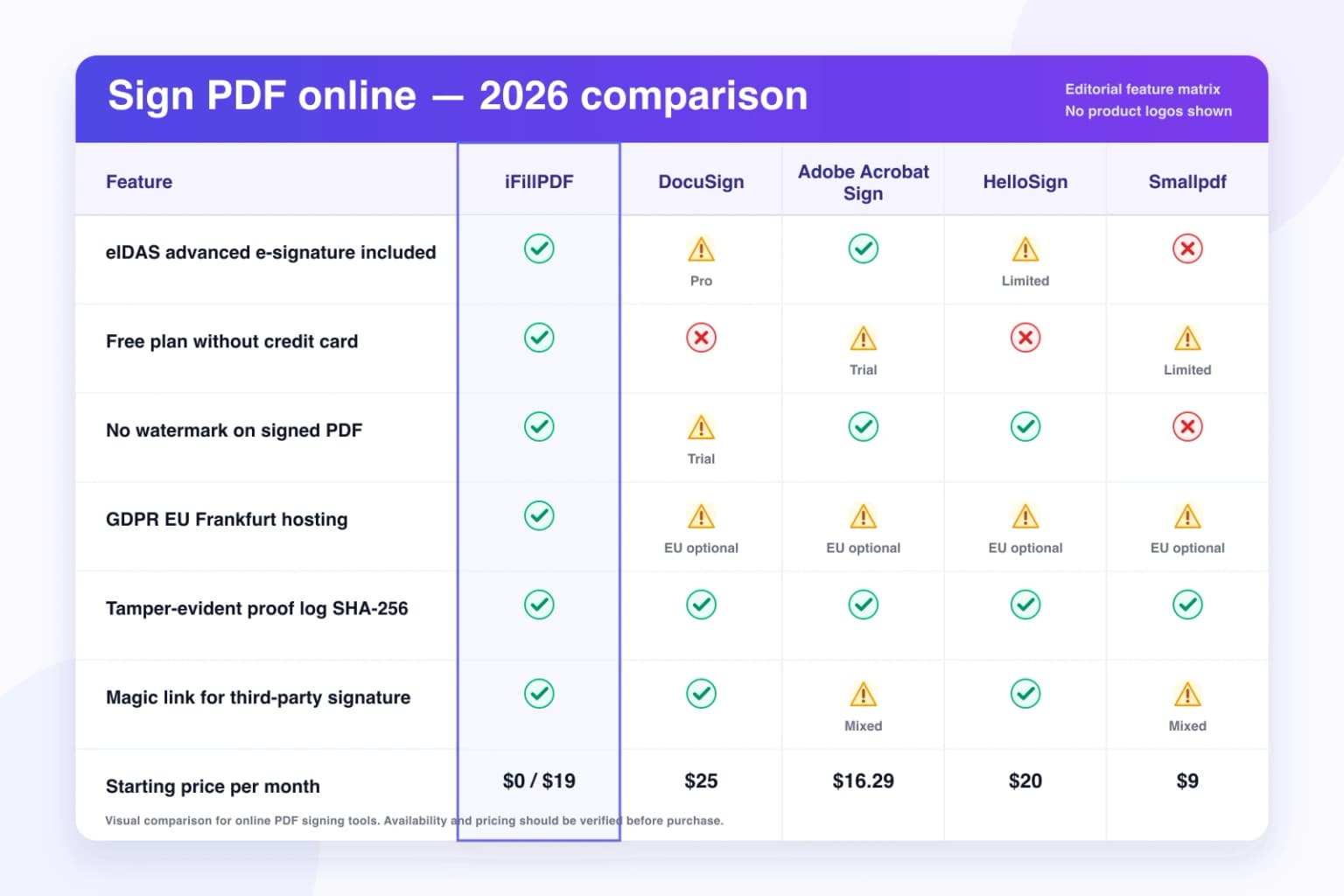
Free plan with no credit card — DocuSign $15-$40/mo, Adobe $14.99-$39.99/mo, HelloSign $20/mo, PandaDoc $19/mo, Dropbox Sign $20/mo
iFillPDF Free covers everything with a watermark and 0 AI Deep Detect, with no credit card and no DocuSign-style 30-day trial expiry. A one-time $8.…
Send for signature via a secure link
Email a PDF to a client, tenant, contractor or counterparty via a link backed by an HMAC-SHA256 signed token. The recipient opens the link and signs in any browser without creating an iFillPDF account, and the signed document…
Technical details
Draw, type or upload your e-signature in 30 seconds and download a signed PDF backed by a timestamped audit trail built to satisfy the federal ESIGN Act 15 USC §7001 (Electronic Signatures in Global and National Commerce Act 2000), the Uniform Electronic Transactions Act 1999 adopted in 47 states + DC + USVI + PR (Illinois uses the IL Electronic Commerce Security Act 5 ILCS 175 and New York the NY General Obligations Law §304 — iFillPDF complies with all three) and 28 USC §1746 unsworn declarations. iFillPDF issues a Simple Electronic Signature (SES): the signature you drew or typed is drawn into the PDF, and every send is anchored by a SHA-256 hash of the exact bytes delivered, a server-side timestamp of each open and signature, the recipient email, and an optional 6-digit access code. There is no certificate authority, no PKI certificate and no qualified timestamping service behind it — an SES is what ESIGN and UETA actually require, but if your use case demands an Advanced or Qualified signature under eIDAS, use a qualified trust service provider instead. Hosted on Hetzner Falkenstein (Germany), outside the reach of the US Cloud Act 50 USC §3024 and FISA Section 702 surveillance — critical if you handle PHI under HIPAA 45 CFR §164.312(d), client tax data under IRS Pub 1075, financial records under GLBA 16 CFR Part 314 or SOX §404, or EU client agreements under GDPR Art. 44-50.
Previews and proof
Go further with lifetime access
E-signature proof log, business templates, no watermark. $8.99, one payment, for life — no subscription.
Frequently asked questions
Is iFillPDF really free to sign a PDF, or is it another DocuSign-style trial?+
Genuinely free, no card, no expiry. The Free plan covers everything with a watermark on the exported PDF and 0 AI Deep Detect, including the ESIGN/UETA simple electronic signature and the SHA-256 send audit — only open tracking, AI Deep Detect and watermark removal are paywalled. For comparison: DocuSign Free is a 30-day trial that drops to 0 envelopes; Adobe Acrobat Sign requires Acrobat Pro $19.99/mo; HelloSign Free covers 3 docs/mo with watermark; Dropbox Sign Free is 3 signature requests/mo. iFillPDF Lifetime at $8.99 once (watermark removed, open tracking, AI Deep Detect in one-time credit packs) undercuts DocuSign Personal $15/mo on volume, Adobe Acrobat Sign Individual $14.99/mo on EU hosting, HelloSign $20/mo, PandaDoc $19/mo and Dropbox Sign $20/mo on Cloud Act exposure. For certificate-backed PAdES or eIDAS Qualified signatures, use DocuSign, Adobe or a qualified trust service provider; iFillPDF focuses on simple electronic signatures with EU hosting and a lower entry price.
Is the e-signature legally binding in US federal court?+
Yes — admissible under the federal ESIGN Act of 2000 (15 USC §7001-§7006), UETA 1999 (47 states + DC + USVI + PR), the Illinois Electronic Commerce Security Act 5 ILCS 175 (Illinois did not adopt UETA), and the New York General Obligations Law §304 / NY ESRA Article III. Three things must be provable in court: (1) intent to sign, (2) attribution to the signer, (3) integrity of the signed document — iFillPDF records the first two through the signing act itself and the recipient email the link was sent to, and the third through a SHA-256 hash of the exact bytes delivered plus the server-side timestamp of every open and signature. Be clear-eyed about the limits: this is a Simple Electronic Signature; if you need a signing certificate, qualified timestamp or FRE 902(13) certification because a counterparty is likely to contest authorship, a certificate-backed signature from a qualified trust service provider is the safer instrument. Carve-outs that still require wet ink (ESIGN §103): wills, codicils, testamentary trusts, family law (divorce, adoption, child custody, prenups in some states), court orders, product recall notices, certain UCC Article 3 negotiable instruments, and notices of acceleration on residential mortgages in 14 states. iFillPDF auto-flags these document types in the upload screen.
Does iFillPDF produce a PAdES or eIDAS Qualified signature?+
For PAdES-LTV, eIDAS Advanced (AES) or Qualified (QES) signatures, use a qualified trust service provider: those levels require a signing certificate issued by a certificate authority, a private key held by the signer, and — for LTV — an RFC 3161 timestamp from a qualified timestamping authority plus embedded OCSP/CRL revocation evidence. iFillPDF gives you a Simple Electronic Signature (SES) — the drawn, typed or uploaded signature rendered into the page — plus a SHA-256 hash of the exact bytes sent and a timestamped record of each open and signature. Under ESIGN §106(5), UETA §2(8) and eIDAS Art. 25 an SES is a valid signature and cannot be denied legal effect merely for being electronic; for a notarized deed or a filing that names QES explicitly, go through a QTSP.
What is the difference between an electronic signature and a digital signature?+
An electronic signature is the legal act of consenting to a document under ESIGN §106(5) — typing your name, drawing with a finger, clicking I agree, even forwarding an email reply with intent. A digital signature is the cryptographic technology (X.509 PKI certificate, private key, hash) that binds a named identity to the document. iFillPDF provides the first, not the second: your signature is drawn into the page and the sent document is hash-anchored with SHA-256, but nothing in the file is signed by a certificate. That distinction matters when you shop around — several tools market "digital signature" for what is technically an electronic one, so ask any vendor whether a certificate authority is involved before you rely on the word.
Is my PDF safe? Is iFillPDF subject to the US Cloud Act or FISA Section 702?+
iFillPDF infrastructure is hosted on Hetzner Falkenstein (Saxony, Germany), a German GmbH with no US legal presence. We are immune to US Cloud Act 50 USC §3024 cross-border data subpoenas, FISA Section 702 mass surveillance, National Security Letters under 18 USC §2709, and gag orders under 18 USC §2705(b). The only legal regime that applies is German BDSG, EU GDPR, and the EU TADPF (Trans-Atlantic Data Privacy Framework). Files are AES-256-GCM encrypted at rest with envelope encryption (per-file DEK + KMS-managed KEK), TLS 1.3 in transit, ISO/IEC 27001-aligned infrastructure, and auto-deleted 1 hour after the signed PDF is downloaded. We never use your files to train AI — Terms §4.2 — unlike DocuSign ToS §3.4, Adobe Sign ToS §2.5, and HelloSign Privacy Policy §6 which reserve broad data-processing rights. Critical if you handle PHI under HIPAA 45 CFR §164.312(d), client tax data under IRS Pub 1075 §9.3, attorney-client privilege under ABA Model Rule 1.6(c), GLBA-protected non-public information under 16 CFR Part 314 (Safeguards Rule), or SOX §404 internal control records.
Can I send a PDF to someone else to sign, like DocuSign request signature?+
Yes — via a link backed by an HMAC-SHA256 signed token. The recipient gets an email, opens the link in any browser (Chrome, Safari, Firefox, Edge — desktop or mobile), fills and signs without creating an iFillPDF account, and the signed document comes back to you. You can require a 6-digit access code before the document renders, and the share record keeps a SHA-256 hash of the exact snapshot delivered plus the timestamp of each open. DocuSign at $25/mo is the better fit for multi-signer routing, SMS one-time codes, government-ID checks and knowledge-based identity verification. This flow is one recipient per link; if a filing requires NIST SP 800-63-3 IAL2 identity proofing, use a dedicated identity-proofing provider.
Which document types are supported, and what about IRS, USCIS, healthcare and real-estate forms?+
All PDF types: AcroForms, flat scans, contracts and NDAs exported from Word, Google Docs or Pages, MSAs, employment offer letters, IRS forms (W-9, W-8BEN, W-8ECI, W-2, 1099-NEC, 1099-MISC, Form 8879 e-file authorization, Form 4506-C, Form 1040 Schedule C), USCIS forms (I-9 employment eligibility, I-130, I-485, N-400 naturalization), DOS DS-160, real-estate disclosures (TDS California, RPDS Texas, federal Lead-Based Paint Disclosure under 42 USC §4852d), healthcare consent forms compliant with HIPAA 45 CFR §164.508, residential leases compliant in all 50 states + DC, board resolutions and operating agreements for LLCs in Delaware, Wyoming and Nevada. Output is a flattened PDF with the signature drawn into the page — it opens in Adobe Acrobat Reader, Foxit, Preview (macOS), Chrome built-in viewer, and any ISO 32000-compliant reader. HIPAA Business Associate Agreement (BAA) available with the Lifetime offer; FedRAMP Moderate equivalent infrastructure for federal contractor use.
Do I need to install Adobe Acrobat, the DocuSign desktop app, or any browser extension?+
No installation, no extension, no desktop app. Everything runs in your browser: Chrome, Safari, Firefox, Edge — on Windows 10/11, macOS 12+, Ubuntu/Debian Linux, iOS 15+ (iPhone, iPad), Android 11+, and ChromeOS. Touch-sign with finger or stylus on iPad Pro / Apple Pencil, Galaxy Tab S / S Pen, Surface Pro / Surface Pen. No need for Adobe Acrobat Pro $19.99/mo, Adobe Acrobat Reader DC, the DocuSign desktop client, the HelloSign Outlook plugin, or any Chrome extension that reads your other tabs. Your browser captures the pen strokes; the PDF is rendered and exported on Hetzner Falkenstein servers in Germany.
Guides to signing PDFs
More PDF tools
Keep going with a related tool — try without signing up, free account to download.