Convert any PDF to editable Word
Convert PDF to editable Word (.docx) free. Start with a PDF containing selectable text; iFillPDF uses AI-based OCR to recognize document content. GDPR Frankfurt EU hosting.
How it works
Upload your PDF
Drag-and-drop or paste from clipboard. Files up to 100 MB / 500 pages on the free plan; the engine auto-detects whether your PDF is digital (Word -> PDF -> Word round-trip) or image-only…
Smart conversion
Headings (H1-H6), paragraph spacing, bullet and numbered lists, multi-column layouts and tables are mapped to native Office Open XML structures rather than floating text boxes, so the result…
Download .docx
A standards-compliant .docx (ECMA-376 / ISO/IEC 29500:2016) ready to edit in Microsoft Word 2016+, Microsoft 365, Google Docs, Apple Pages or LibreOffice Writer.…
Why choose iFillPDF
AI-based OCR for document content
Digital PDFs convert from their existing text layer. For scans and faxes, iFillPDF uses AI-based OCR to recognize document content, and the practical rule is simple: review the recognized text before you depend on the Word file.…
Native Word tables — AI reconstruction even without borders
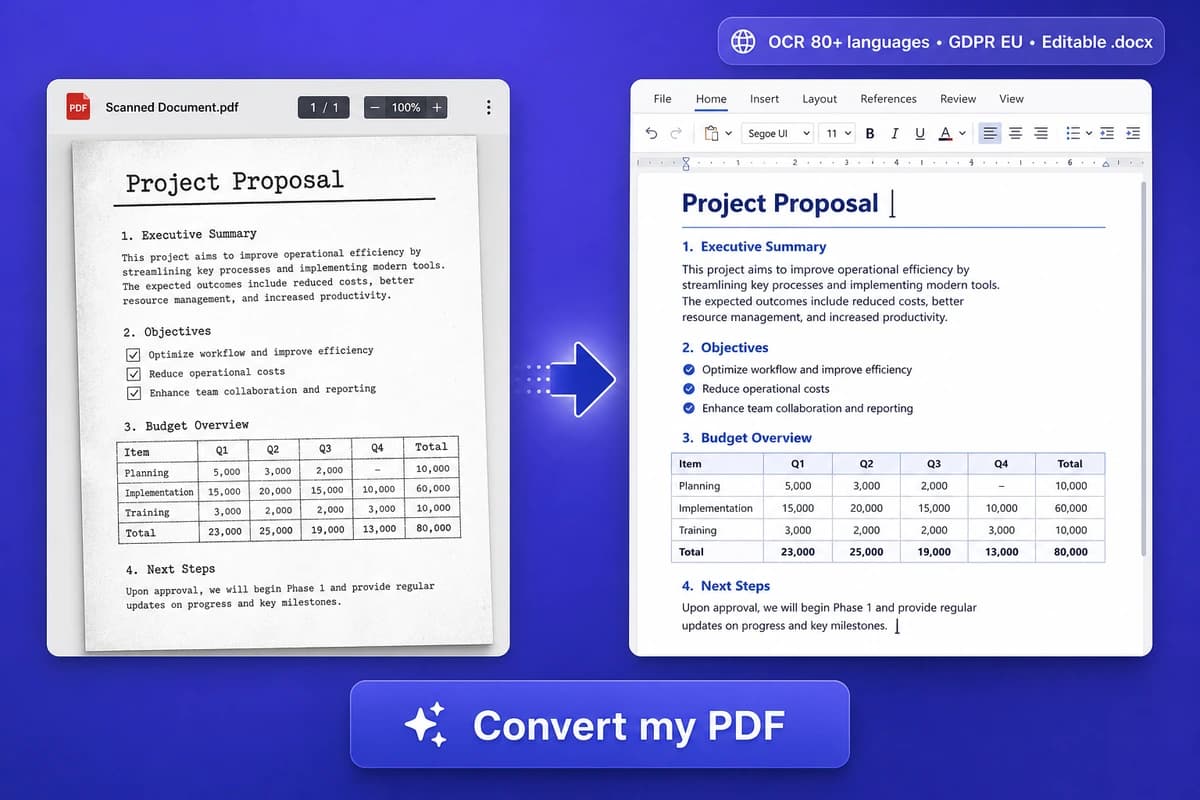
PDF tables become real Microsoft Word tables (w:tbl elements) you can sort, formula-edit and re-style — not floating text boxes.…
Headings, fonts and styles preserved
Real H1-H6 styles map to Word built-in heading styles (so the Navigation pane and auto-Table-of-Contents work). Original fonts are embedded when license-permitted; otherwise smart substitution to the closest metric-compatible font…
ECMA-376 / ISO/IEC 29500:2016 compliant output
The .docx is valid Office Open XML (ECMA-376 5th edition, ISO/IEC 29500:2016) — the same standard Microsoft Word saves natively.…
Hetzner Falkenstein EU hosting, GDPR + TADPF
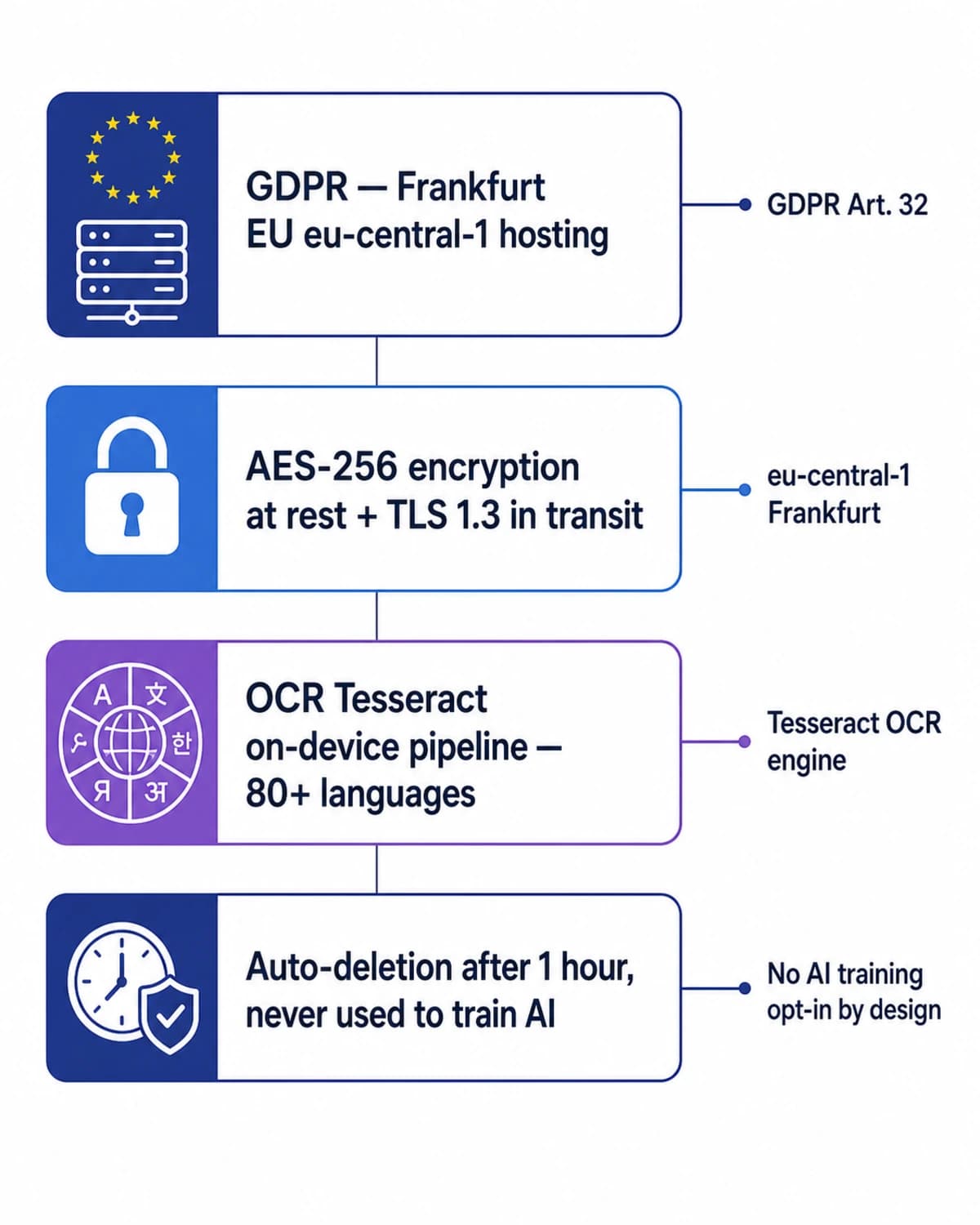
PDFs are processed in Frankfurt and Falkenstein on Hetzner Online infrastructure (eu-central-1), TADPF-aligned (EU-US Trans-Atlantic Data Privacy Framework), AES-256 at rest, TLS 1.3 in transit, auto-deleted after 1 hour.…
No AI training on your files — explicit ToS
Section 7.3 of our Terms states your PDFs are never used to train, fine-tune or evaluate AI models, in line with GDPR Art. 5 purpose-limitation.…
Technical details
Turn a digitally generated PDF — an export from Word, a business system, a browser, an IRS Form W-9 or Schedule C downloaded from irs.gov — into a fully editable .docx that opens in Microsoft Word 2016+, Microsoft 365, Google Docs or Apple Pages without re-formatting. For Word conversion, start with a PDF containing selectable text; iFillPDF uses AI-based OCR to recognize document content, and difficult scans should be reviewed before you depend on the reconstructed file. Google Docs is a free fallback, Adobe Acrobat Pro bundles OCR at $19.99/mo and ABBYY FineReader at $199 is the accuracy benchmark. For a PDF exported from Word, a business system or a browser, conversion works directly. Output is ECMA-376 / ISO/IEC 29500:2016 (Office Open XML) compliant, with AI table reconstruction even for borderless tables, real heading styles (H1-H6), preserved fonts and embedded images. Source PDFs read as ISO 32000-2:2020. Hetzner Falkenstein EU hosting (TADPF-aligned), AES-256 at rest, auto-deleted after 1 hour, never used to train AI — fit for FRCP Rule 34 ESI workflows, ESIGN Act 15 USC §7001 records and attorney-client privileged material.
Previews and proof
Go further with lifetime access
E-signature proof log, business templates, no watermark. $8.99, one payment, for life — no subscription.
Frequently asked questions
Is it really free?+
Yes. OCR conversion is free on every page (with a watermark, 0 AI Deep Detect), no credit card required, no email signup for the converter. Lifetime is $8.99 paid once (no subscription) and includes the HIPAA BAA; AI Deep Detect comes in one-time credit packs (10, 50 or 200 credits). Adobe Acrobat Pro charges $19.99/mo for the same scope (limited to one user), Nitro PDF Pro $179.99/yr (~$15/mo) without OCR on the free tier, ABBYY FineReader $199/yr one-time-feel but bills annually.
Will scanned PDFs convert correctly?+
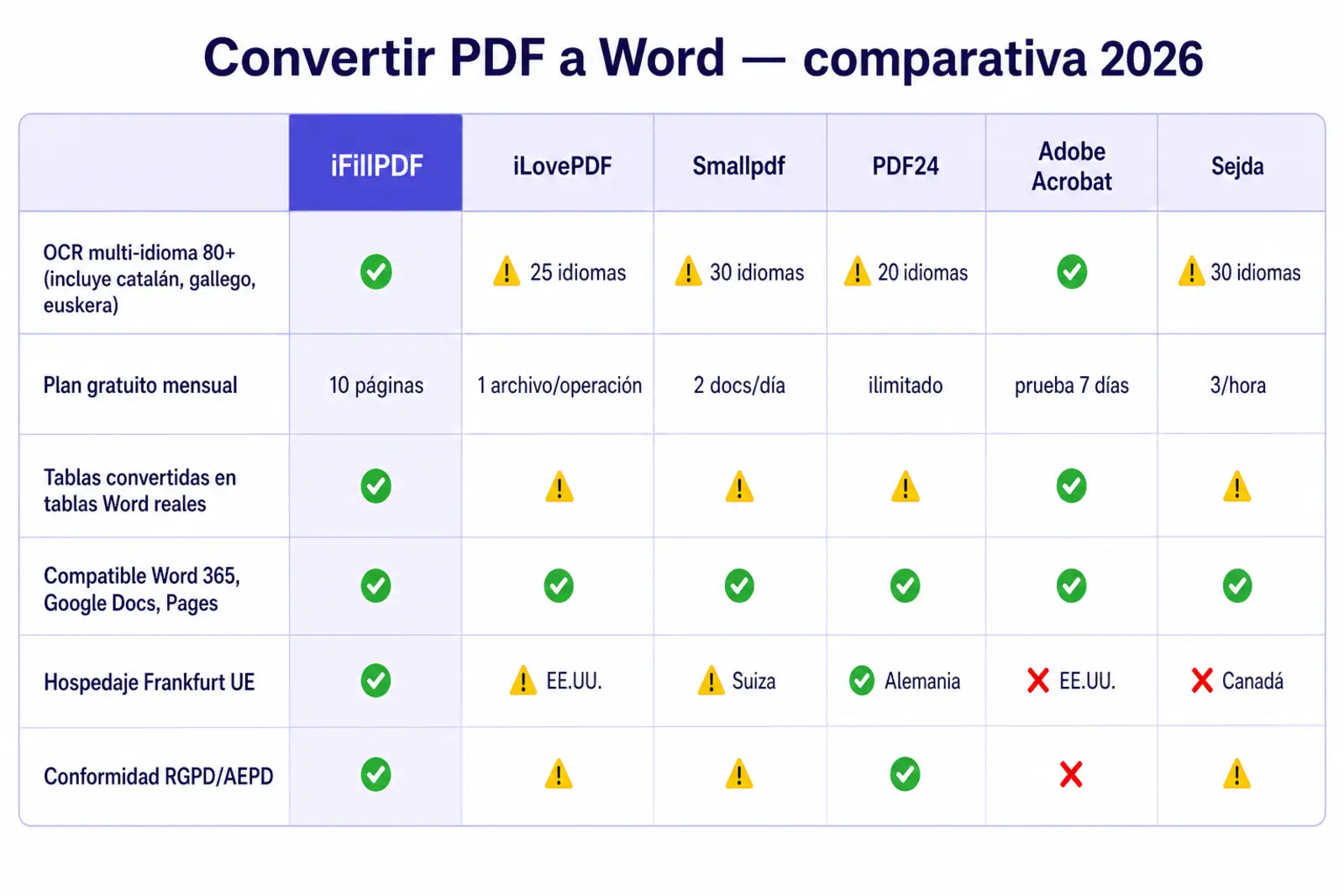
For a Word export, use a PDF with selectable text whenever possible and review the result before relying on it. iFillPDF uses AI-based OCR to recognize document content. Free tiers from iLovePDF, Smallpdf, Adobe Acrobat online and Nitro commonly hand back an image of the page wrapped in a .docx unless you pay for OCR. If a scan is difficult, the free fallback is Google Docs; paid options include Adobe Acrobat Pro $19.99/mo, Smallpdf Pro $9/mo and ABBYY FineReader $199 once.
Is the layout preserved?+
Yes for digitally generated PDFs (Word -> PDF -> Word round-trip): fonts, headings, paragraph spacing, multi-column layouts and tables come out as native Office Open XML structures (w:tbl, w:p, w:pStyle). For scans, our AI table-reconstruction model rebuilds borderless and merged-cell tables that Smallpdf and iLovePDF flatten. Output validates as ECMA-376 / ISO/IEC 29500:2016 in Microsoft Word 2016+, Microsoft 365, Google Docs and LibreOffice Writer.
How do I know whether my PDF is a scan or a digital document?+
Open it in any reader and try to select a line of text with your cursor. If the text highlights, the PDF carries a text layer and will convert here. If your cursor draws a rectangle over the page instead, it is an image — a scan, a fax or a photo — and needs OCR before any converter can produce editable text. A second tell: search for a word you can see on the page; no result means no text layer. It is a five-second check that saves a disappointing upload.
Is my data safe for legal and HIPAA workflows?+
Yes. PDFs are processed in Frankfurt and Falkenstein on Hetzner Online (eu-central-1, ISO/IEC 27001-aligned), AES-256 at rest, TLS 1.3 in transit, auto-deleted after 1 hour. Section 7.3 of our Terms explicitly states no AI training on user files (GDPR Art. 5 purpose-limitation). HIPAA BAA available with the Lifetime offer. Adobe (Acrobat online), Nitro and some Smallpdf endpoints reserve broader rights to use uploaded content for product improvement — a problem for FRCP Rule 34 ESI productions, ESIGN Act 15 USC §7001 records, attorney-client privileged material and trade secrets.
How does iFillPDF compare to Adobe, Smallpdf, iLovePDF and Nitro?+
Adobe ($19.99/mo), Smallpdf ($9/mo), iLovePDF ($7/mo) and Nitro ($179.99/yr) paywall OCR on scanned pages; iFillPDF uses AI-based OCR to recognize document content, with Google Docs as a free fallback for difficult scans. For Word conversion, start with selectable text and review OCR output before relying on it. iFillPDF outputs valid ECMA-376 .docx and additionally rebuilds borderless tables. On hosting: iFillPDF is GDPR Frankfurt EU (TADPF), the others are US-hosted by default. On AI training opt-out: iFillPDF Section 7.3 is explicit, Adobe and Nitro reserve broader rights. On entry price: iFillPDF $8.99 once (Lifetime), Adobe Acrobat Pro $19.99/mo, Nitro PDF Pro ~$15/mo (yearly only), ABBYY FineReader $199/yr.
More PDF tools
Keep going with a related tool — try without signing up, free account to download.