Convert PDF to JPG free — 300 DPI, no upload, no signup
Convert every PDF page to JPG in your browser — 72, 150 or 300 DPI, adjustable JPEG quality, one image per page. No upload, no signup, EU Frankfurt.
How it works
Drop your PDF
Drag-and-drop a file up to 100 MB — works on iPhone Safari, Android Chrome, macOS and Windows desktop. The first page renders as a live preview in under two seconds on an M1 MacBook Air, so…
Pick DPI and JPEG quality
Three DPI presets: 72 (web, email, Slack), 150 (Instagram, standard office print) and 300 (pro magazine, Etsy listing, Amazon FBA print-back).…
Download one JPG per page
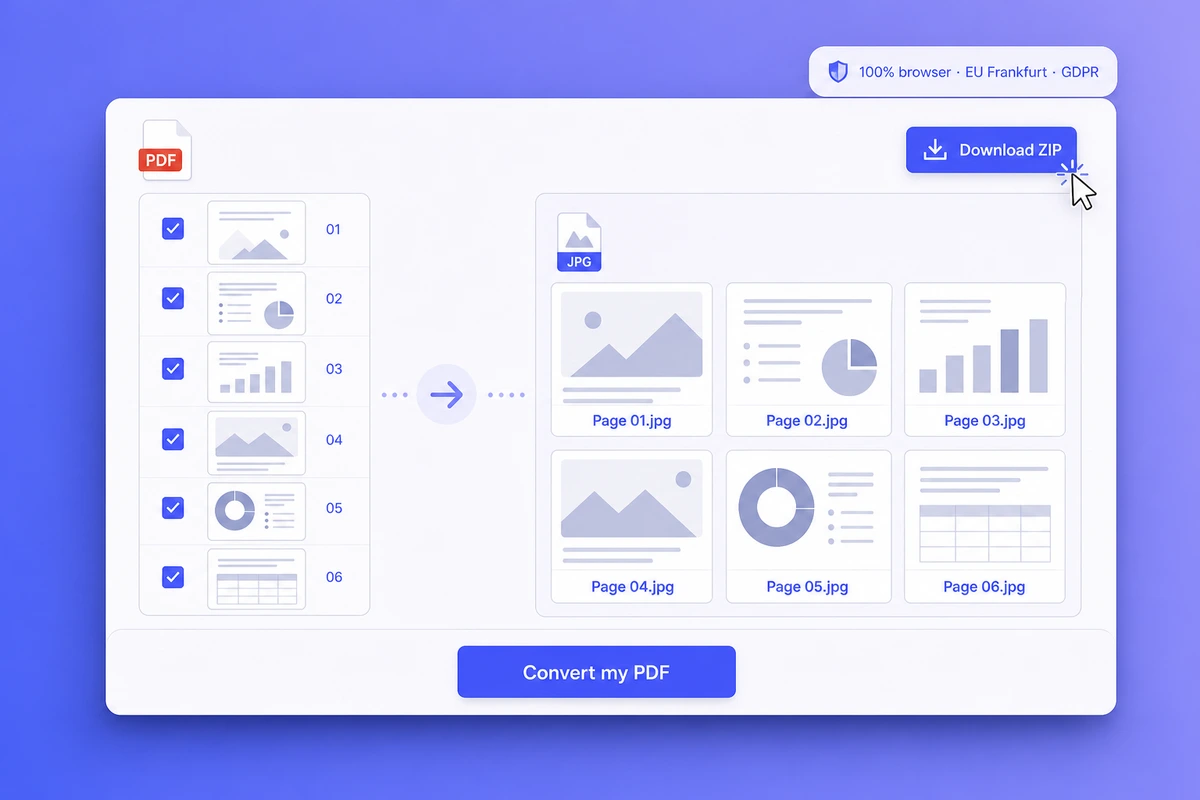
Hit convert and every page is saved as its own numbered file — document-page-01.jpg, document-page-02.jpg — straight into your downloads folder, a quarter-second apart, with a progress…
Why choose iFillPDF
3 DPI presets + a real JPEG quality slider — 72/150/300, all free
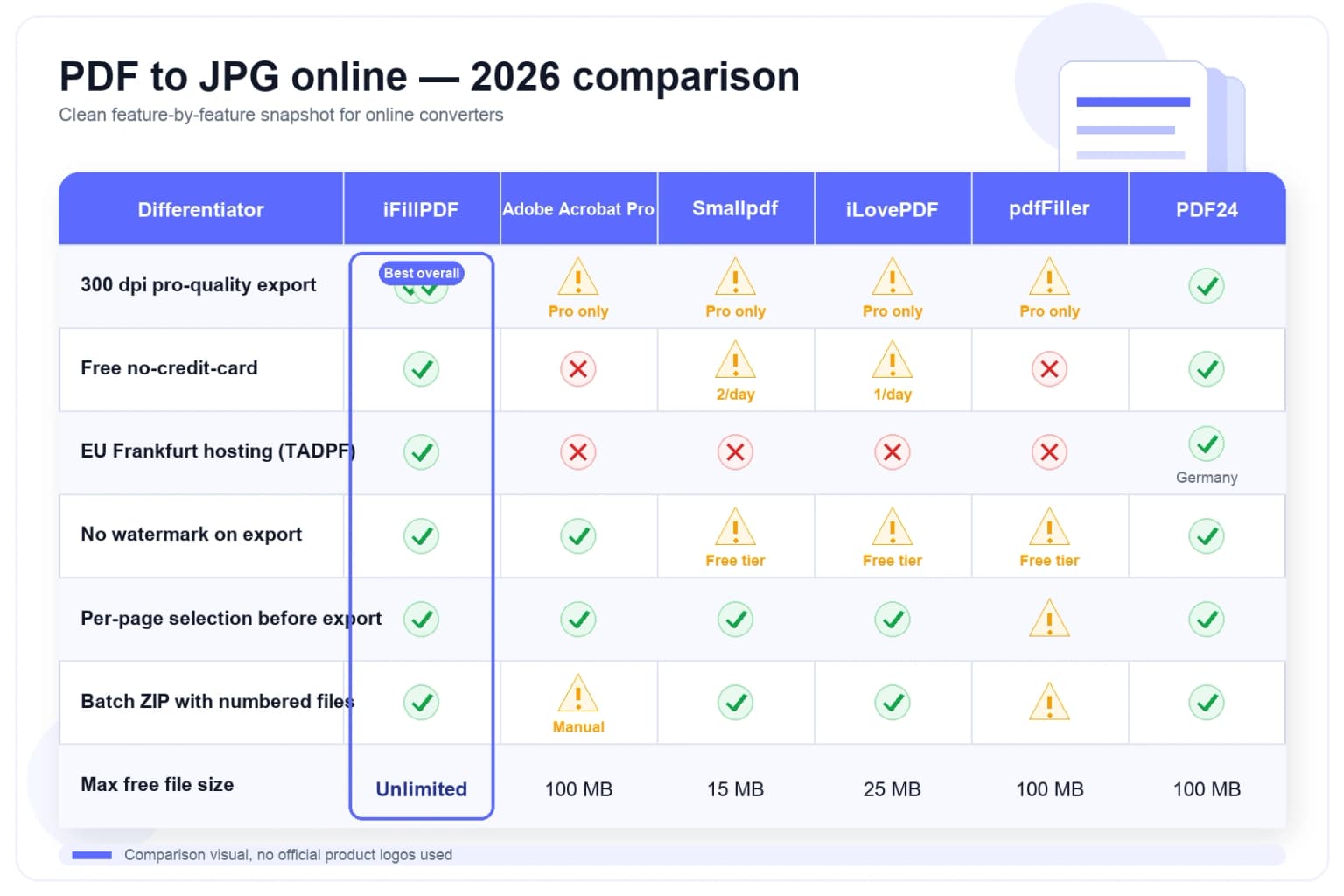
Adobe Acrobat online, iLovePDF, Smallpdf, ILoveImg, Canva, Sejda, Foxit, Soda PDF, CloudConvert, Convertio and Zamzar all default to ~150 DPI and gate anything higher behind a paid tier (Adobe Acrobat Pro $19.…
Client-side WebAssembly — your PDF never uploads, FISA 702-proof
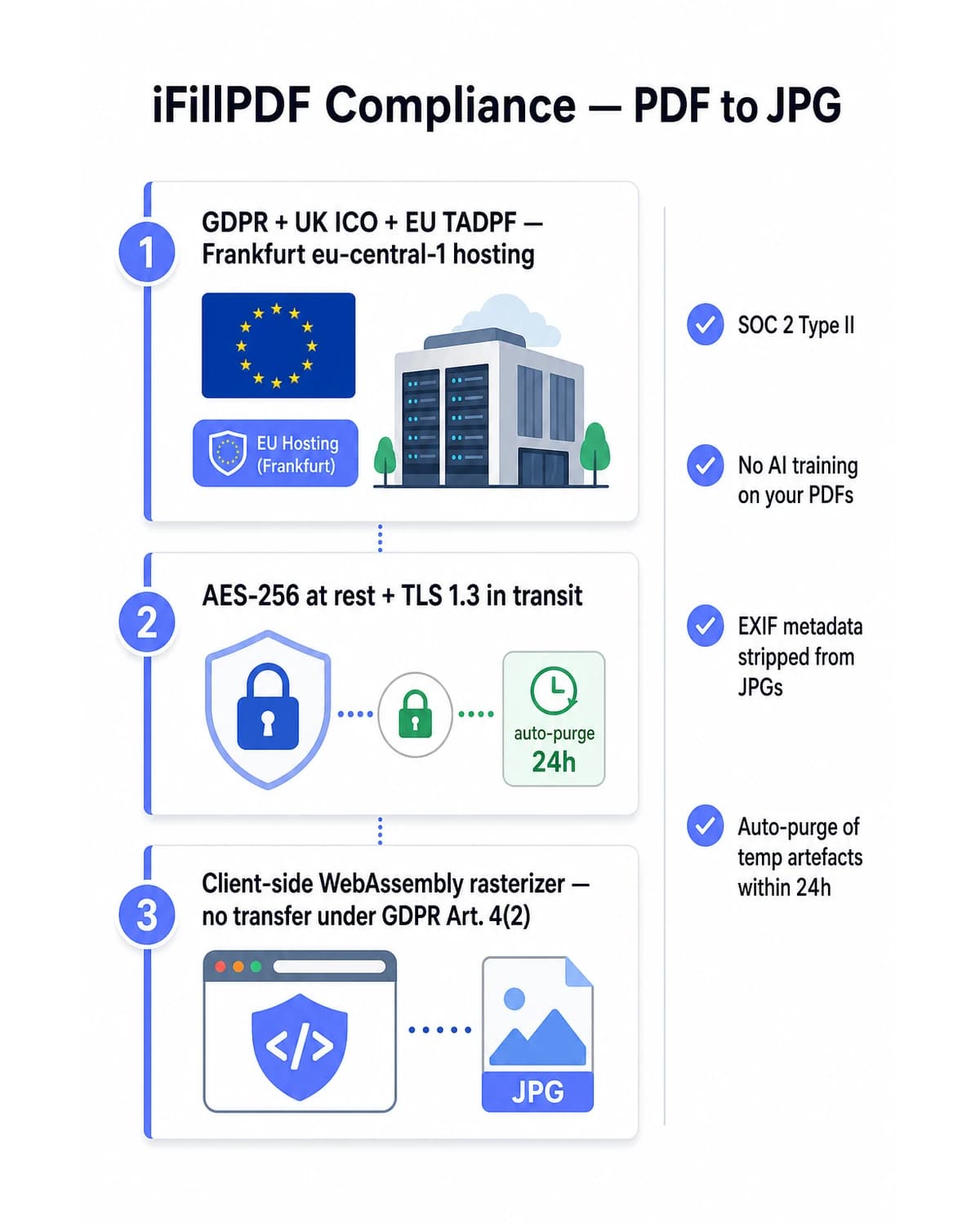
PDF-lib and Mozilla pdf.js compiled to WebAssembly (W3C standard) run the entire ISO 32000-2:2020 rendering pipeline inside your browser tab.…
Clean sRGB output with no metadata to leak
Every page is re-rendered onto a fresh canvas and encoded as a standard sRGB JPEG. That has a privacy consequence worth naming: nothing from the source document — no camera serial, no GPS coordinates, no capture timestamp, no…
Every page in one pass, saved straight to your disk
One click converts the whole document — a 50-page residential lease, an 80-page lab report, a 200-page real-estate disclosure — and each page lands in your downloads folder as document-page-01.jpg, document-page-02.…
Hetzner Falkenstein EU hosting — TADPF, ISO/IEC 27001, GDPR Art. 4(2)
When telemetry pings or static assets ship from our edge, they ship from Hetzner Online infrastructure in Falkenstein and Frankfurt (eu-central-1, ISO/IEC 27001-aligned, AES-256 at rest, TLS 1.…
Technical details
Turn every page of any PDF — IRS Form W-9, W-2, 1099-NEC, 1040 e-filing supporting docs, USCIS I-129 / I-130 / N-400 evidence (25 MB attachment cap), scanned residential lease, real-estate MLS listing, photographer portfolio, Etsy product sheet, Instagram carousel, Shopify product gallery, school assignment, ESIGN Act (15 USC §7001) signed contracts — into pixel-perfect JPEG images (ISO/IEC 10918-1 + JFIF 1.02, with optional Exif 2.3 retention or full strip) right in your browser. Powered by PDF-lib and Mozilla pdf.js compiled to WebAssembly (W3C), the entire ISO 32000-2:2020 page-rendering pipeline runs 100% client-side: your PDF never leaves your device, never hits a server, never crosses the US Cloud Act (50 USC §3024), FISA 702 or NSL jurisdiction line. Pick from 3 DPI presets — 72 (web, Slack, Discord, email body), 150 (Instagram, LinkedIn, standard office print) and 300 (pro print, magazine, Etsy POD, Amazon FBA, IRS print-back) — combined with a JPEG quality slider from 50% to 100% in 5-point steps. Every page is exported as its own numbered .jpg (document-page-01.jpg, document-page-02.jpg) and saved straight to your downloads folder, one after another: there is no ZIP bundle, no page picker and no ICC profile selector, and the output is standard sRGB. Because the pages are re-rendered onto a fresh canvas rather than copied, no Exif or GPS block from the source survives into the JPG — your scanned 1099 or sublet listing ships clean by construction. Need lossless or transparency instead? Our PDF to PNG tool is one click away. Adobe Acrobat Pro ($19.99/mo), Smallpdf ($9/mo, 2 free/day), iLovePDF Premium ($7/mo, 25 MB free cap), ILoveImg ($4/mo), Canva Pro ($14.99/mo), pdfFiller ($20/mo), Sejda ($7.50/mo, 3 tasks/h free), Foxit ($9.99/mo), Soda PDF ($7.99/mo), CloudConvert ($9.99/mo), Convertio ($9.99/mo) and Zamzar ($9/mo) all upload your file to a US server and gate high-resolution export or batch conversion behind a paid tier. PDF24 Tools is free but US-server based. iFillPDF is unlimited, free forever, EU-hosted on Hetzner Falkenstein (TADPF-aligned, eu-central-1, ISO/IEC 27001) and signup-free.
Previews and proof
Go further with lifetime access
E-signature proof log, business templates, no watermark. $8.99, one payment, for life — no subscription.
Frequently asked questions
Is it really free, with no signup, no daily limit, no watermark?+
Yes. PDF to JPG is fully free, no credit card, no email, no daily cap, no watermark, no Sejda 3-tasks/h cap, no Zamzar 2-conversions/24h cap, no CloudConvert 25-min/day total. Convert as many PDFs as you want, at 72, 150 or 300 DPI, with the JPEG quality slider anywhere from 50% to 100%. Smallpdf caps the free tier at 2 conversions per day before forcing the $9/mo Pro upgrade; iLovePDF gates Premium features (advanced compression, OCR, 200 MB files) at $7/mo; ILoveImg charges $4/mo for ad-free; Adobe Acrobat online requires sign-in with Acrobat Pro at $19.99/mo; Canva Pro $14.99/mo; pdfFiller $20/mo; Sejda $7.50/mo; Foxit $9.99/mo; Soda PDF $7.99/mo; CloudConvert $9.99/mo; Convertio $9.99/mo; Zamzar $9/mo. PDF24 Tools is free but US-hosted only with no DPI control. iFillPDF runs unlimited free because the work happens in your browser — we have no server cost per conversion.
Does my PDF really stay on my device — Cloud Act and FISA 702 question?+
Yes. PDF rendering runs client-side via PDF-lib and Mozilla pdf.js compiled to WebAssembly (W3C). The entire ISO 32000-2:2020 page tree is parsed and rasterized inside your browser tab — your PDF bytes never leave your laptop or phone, never reach an iFillPDF server, never cross the US Cloud Act (50 USC §3024), FISA 702 or NSL gag-order jurisdiction line. Under GDPR Art. 4(2) there is no personal-data processing on our side. Adobe Acrobat online, Smallpdf (mixed Switzerland/US), iLovePDF (mixed Spain/US), Canva (US/AWS), pdfFiller (US), PDF24 Tools (US), Sejda (US), Foxit (US), Soda PDF (US), CloudConvert (US/AWS), Convertio (US), Zamzar (UK/US) and ILoveImg (mixed Spain/US) all upload your PDF to their servers — material risk for IRS 1040 / W-9 / W-2 / 1099-NEC, USCIS I-129 / I-130 / N-400 evidence, ESIGN Act (15 USC §7001) signed contracts and HIPAA PHI scans.
Which DPI and JPEG quality should I pick — 72, 150 or 300, and 50 to 100%?+
Use 72 DPI at 50-75% quality for web display, Gmail and Outlook email body images, Slack and Discord — smallest file, fastest load, well under the Outlook.com 20 MB cap. Use 150 DPI at 75-90% for Instagram carousels, LinkedIn images, standard office print on a home HP or Epson, and IRS Free File 5 MB-per-document supporting attachments. Use 300 DPI at 90-100% for professional print — magazines, Etsy print-on-demand, Amazon FBA listings, Shutterstock submissions, real-estate flyers, IRS 1040 print-back PDFs, USCIS evidence packets. 300 DPI is where this tool stops. For archival reproduction, large-format posters or fine-art print you want 600 DPI or more, and you should use a desktop tool for that rather than any browser converter — ours included. All three presets are free here; Adobe Acrobat online ($19.99/mo), iLovePDF ($7/mo), Smallpdf ($9/mo), Canva ($14.99/mo), Sejda ($7.50/mo), Foxit ($9.99/mo), Soda PDF ($7.99/mo), CloudConvert ($9.99/mo), Convertio ($9.99/mo) and Zamzar ($9/mo) default to ~150 and gate anything above it. PDF24 Tools does not expose DPI at all.
Can I convert only some pages, keep Exif metadata, or pick PNG instead of JPG?+
Pages: no — the converter runs the whole document, so blank pages, ad inserts and signature pages come along too. The practical workaround is to delete the pages you do not want first with our free delete-pages tool, then convert; it takes one extra step and about ten seconds. Exif: there is nothing to keep or strip, because each page is re-rendered from scratch onto a canvas, so no camera serial, GPS coordinate or capture timestamp from the source can survive into the JPG. If you specifically need a source Exif block preserved as forensic chain-of-custody evidence, this is the wrong tool. PNG: yes, as a separate tool — our PDF to PNG converter gives you lossless output with an optional transparent background, ideal for logos, signatures and design assets. TIFF is not offered; Adobe Acrobat online supports it if you need 16-bit archival output.
How does iFillPDF compare across the 13 main PDF-to-JPG converters in 2026?+
On free 300 DPI + a 50-100% quality slider: iFillPDF gives both away, while all 12 paid competitors (Adobe Acrobat online, iLovePDF, Smallpdf, ILoveImg, Canva, pdfFiller, Sejda, Foxit, Soda PDF, CloudConvert, Convertio, Zamzar) gate 300 DPI behind the paid tier and PDF24 Tools omits DPI control entirely. Where they are ahead of us: several offer 600 DPI, page selection and a ZIP bundle, none of which we do. On upload: iFillPDF runs 100% client-side WebAssembly, all 13 competitors upload to a server. On hosting: iFillPDF GDPR Frankfurt EU (TADPF-aligned, Hetzner Falkenstein eu-central-1), Adobe (US/AWS), Smallpdf (CH/US mixed), iLovePDF (ES/US mixed), Canva (US/AWS), pdfFiller (US), PDF24 Tools (US), CloudConvert (US/AWS), Convertio (US), Zamzar (UK/US), Foxit (US), Soda PDF (US), Sejda (US), ILoveImg (ES/US). On daily cap: iFillPDF unlimited free, Smallpdf 2/day, Sejda 3/h + 200 pages, Zamzar 2/24h + 50 MB, CloudConvert 25 min/day, the others gate at 25 MB or behind sign-in. Pricing: Adobe Acrobat Pro $19.99/mo, pdfFiller $20/mo, Canva Pro $14.99/mo, Foxit $9.99/mo, CloudConvert $9.99/mo, Convertio $9.99/mo, Smallpdf Pro $9/mo, Zamzar $9/mo, Soda PDF $7.99/mo, Sejda $7.50/mo, iLovePDF Premium $7/mo, ILoveImg $4/mo, PDF24 Tools free. On color profiles: everyone here, us included, outputs sRGB only. On Exif/GPS: our re-render leaves no source metadata to carry over, while the 13 competitors ship it as-is. On batch output: iFillPDF converts the whole document in one click but saves loose numbered files rather than a ZIP; Adobe Acrobat online forces manual per-page download; CloudConvert and Convertio bundle a ZIP but cap the free tier at 25 MB.
More PDF tools
Keep going with a related tool — try without signing up, free account to download.