Merge PDF files — free, no upload
Merge unlimited PDFs into one — 100% in your browser, no upload, no signup, no watermark. ISO 32000-2 PDF 2.0, GDPR by design, EU Frankfurt. Free forever.
How it works
Drop your PDF files
Add 2 to 100+ PDFs from your desktop, Downloads folder or scanner output. Files stay in your browser RAM — zero upload to our servers, zero transfer logged.
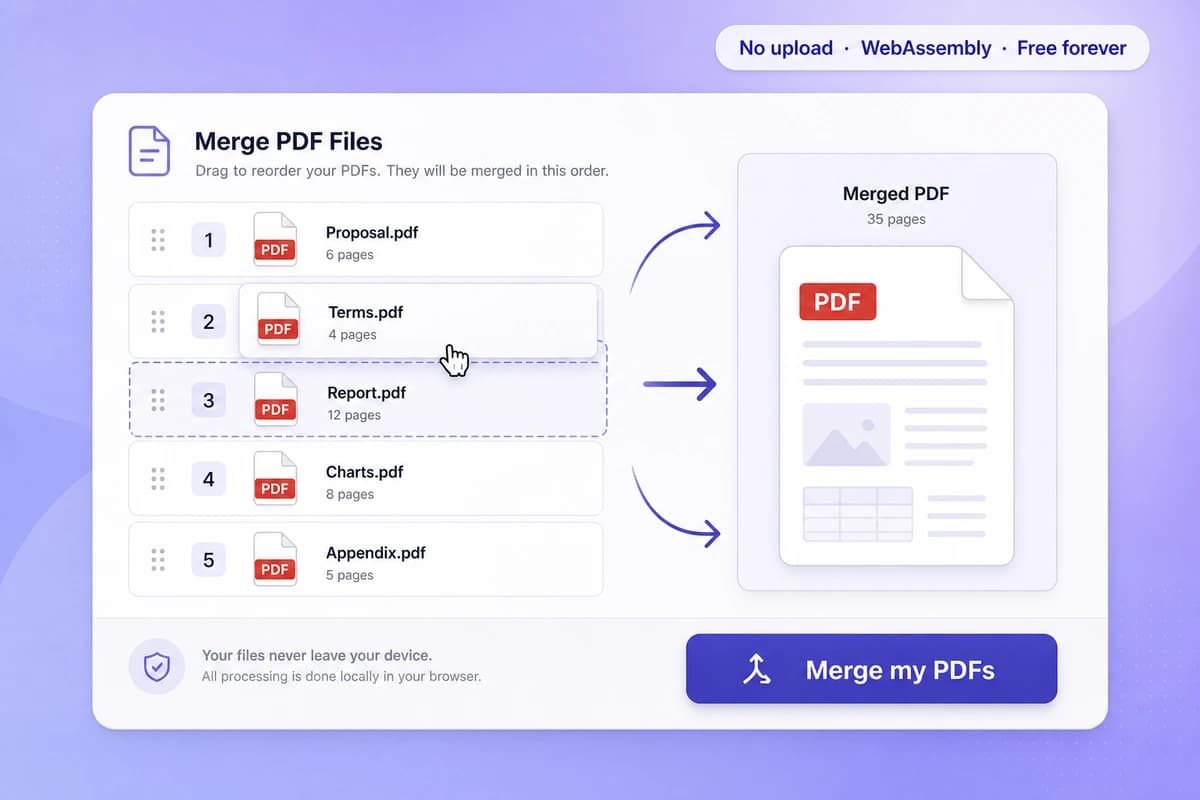
Reorder & combine
Move each file up or down in the list to set the order they will be stitched in, and watch the merged preview update as you go.…
Download your merged PDF
A single PDF generated locally on your machine, ready to print, email, e-sign or file. Pages, fonts and images come across untouched; the source documents’ bookmarks and XMP metadata do not…
Why choose iFillPDF
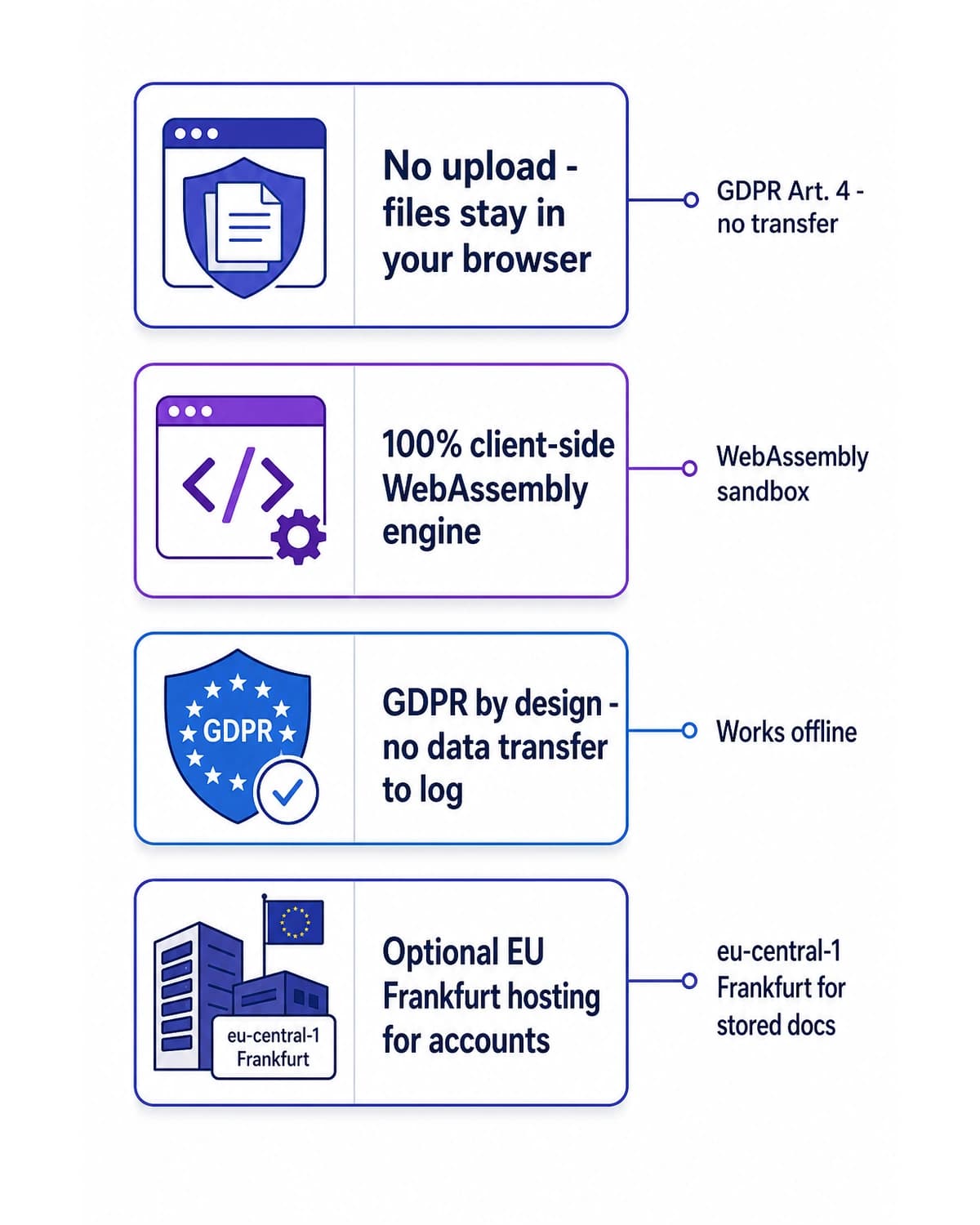
No upload — 100% client-side WebAssembly
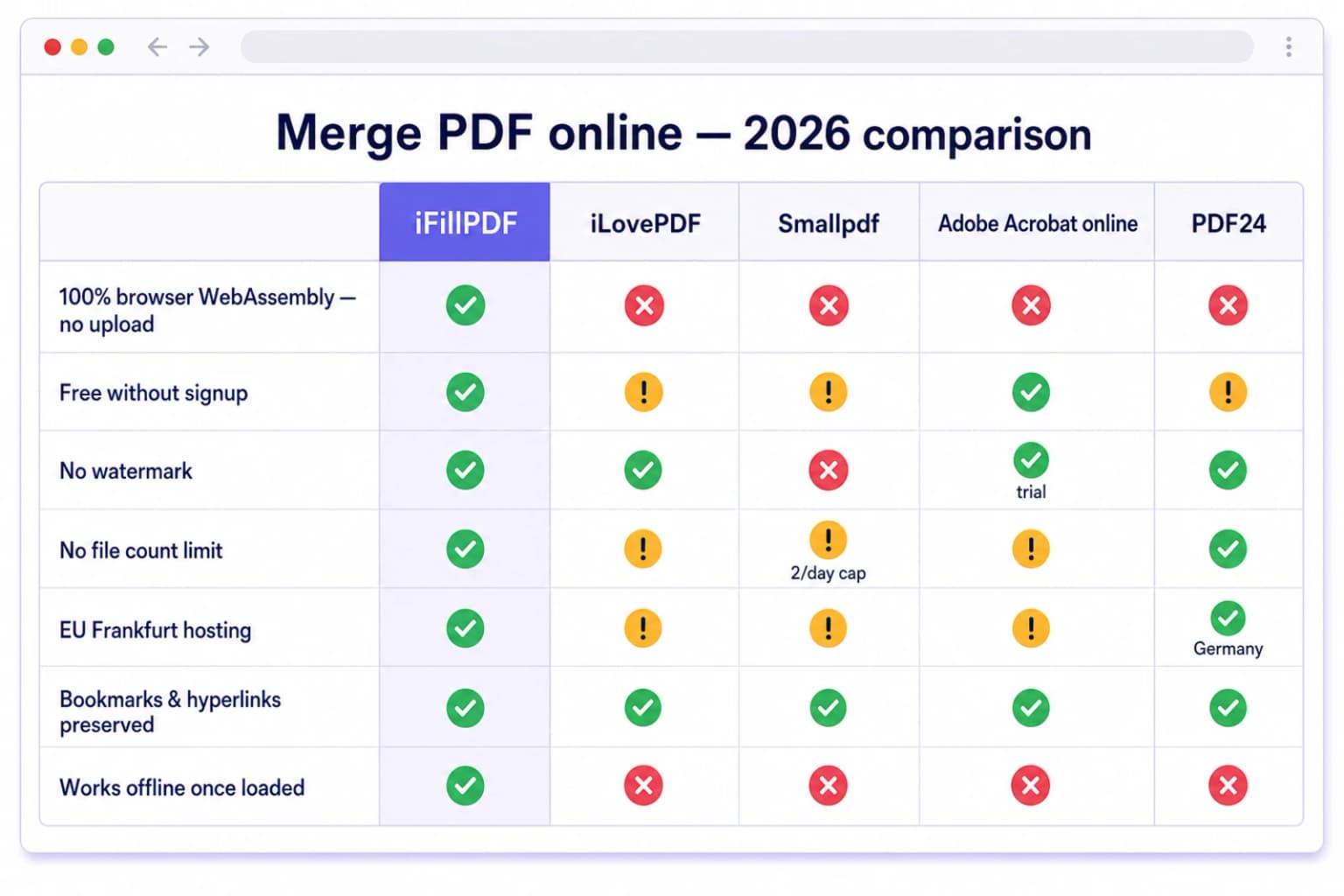
Unlike Adobe Acrobat online ($19.99/mo Pro), Smallpdf ($9/mo, 2 files/day free cap), iLovePDF Premium ($7/mo), Sejda ($7.50/mo, 50 MB and 200-page cap on free), PDF24 Tools and Foxit Editor ($9.…
Standard PDF output every reader opens
The merged file is a plain, standards-conformant PDF written by pdf-lib — it opens identically in Adobe Acrobat Reader DC, Foxit, PDF-XChange, Apple Preview, macOS Quick Look, the Microsoft Edge built-in viewer and enterprise DMS…
Reorder the stack and preview before you download
Move each file up or down with one click to set the merge order, and see the combined result render before you commit — the part of the workflow Adobe Acrobat Pro charges $19.99/month for, free here with no signup.…
What survives the merge — and what does not
Page content, embedded fonts, images, page rotation and AcroForm field widgets are copied across intact, so a fillable page stays fillable and a scan stays pixel-identical.…
No file limit, no signup, no watermark
Combine 2, 10 or 100+ PDF files in one shot. Free forever, no account, no watermark, no email required, no daily quota. Smallpdf caps free users at 2 files/day, Sejda caps at 50 MB total upload, PDFescape ($5.…
Lossless quality + EU Frankfurt for accounts
No recompression, no re-encoding — pixel-perfect fidelity to your originals, with embedded fonts and ICC color profiles carried over untouched inside each page.…
Technical details
Combine 2 to 100+ PDFs into one standards-conformant document in seconds. Page content, embedded fonts, images, page rotation and AcroForm field widgets are copied across untouched — document bookmarks (PDF outlines) and XMP metadata are not carried into the merged file, which is true of any page-level merge and worth knowing before you start. Files never leave your computer — merging runs locally via a WebAssembly engine, unlike Adobe Acrobat Pro ($19.99/mo), Smallpdf ($9/mo, 2-files-per-day cap on free), iLovePDF Premium ($7/mo), Sejda ($7.50/mo, 50 MB cap), PDF24 Tools (free but uploads to German servers), Foxit Editor ($9.99/mo) or Soda PDF ($7.99/mo), which all transfer your documents to cloud servers. Because no upload occurs, the structural conditions of HIPAA 45 CFR §164.312(c)(1) integrity controls, IRS Pub 1075 safeguarding rules, ESIGN Act 15 USC §7001, UETA, FRCP Rule 34 ESI handling and 28 USC §1746 unsworn declarations are met without negotiating a Business Associate Agreement or a Data Processing Addendum. Optional account hosting is on Hetzner Falkenstein eu-central, fully under the EU TADPF perimeter and outside the reach of the US Cloud Act 50 USC §3024 and FISA 702. No signup, no email, no watermark, no file-count cap, lossless quality, one-click reorder, 100 MB per file.
Previews and proof
Go further with lifetime access
E-signature proof log, business templates, no watermark. $8.99, one payment, for life — no subscription.
Frequently asked questions
Is the merge really free and unlimited?+
Yes — 100% free, no signup, no watermark, no daily quota. Merge as many PDF files as you want, as often as you want. Smallpdf caps free users at 2 files per day before pushing the $9/month plan, iLovePDF Premium starts at $7/month, Adobe Acrobat Pro at $19.99/month, Sejda at $7.50/month with a 50 MB cap, PDF24 is free but uploads everything to German servers — iFillPDF is free and processes locally.
Where are my PDF files processed?+
Directly in your browser, in your own RAM, via a WebAssembly engine — nothing is uploaded to our servers. This is the structural difference vs iLovePDF, Smallpdf, Adobe Acrobat online, PDF24 Tools, Sejda, CloudConvert ($9.99/mo) and Foxit Editor ($9.99/mo), which all transfer your files to AWS, Azure or their own datacenters (even with TLS 1.3 in transit, the file still lands on a server they control). Because no data leaves your device, the legal definition of a data transfer under GDPR Art. 4(2) and a use under HIPAA 45 CFR §164.502 does not apply — useful when merging signed contracts, medical records, tax returns, attorney-client work product or anything covered by an NDA, IRS Pub 1075, FRCP Rule 34 ESI duties or the SEC Reg S-P safeguarding rule.
Is it GDPR-compliant and HIPAA-safe?+
Yes — by design. Because PDFs never leave your device, no personal data is processed by iFillPDF, so the legal definition of a data transfer under GDPR Art. 4(2) does not even apply. For HIPAA, the same client-side flow keeps iFillPDF outside the Business Associate role under 45 CFR §160.103 because PHI is not created, received, maintained or transmitted on our infrastructure. For optional account storage, encrypted backups live on Hetzner Falkenstein eu-central under the EU TADPF perimeter, outside US Cloud Act 50 USC §3024 and FISA 702 reach.
How many PDFs can I combine at once, and how big can they be?+
No cap on the number of files; each individual PDF must be 100 MB or smaller, and beyond that your browser RAM is the real ceiling since everything runs in the tab. For long stacks expect a few extra seconds while your CPU does the work — typically 1-3 seconds per 100 pages on a 2020+ laptop. Compare to Sejda which caps free users at 50 MB total and 200 pages, Smallpdf which caps at 2 files/day on free, and PDFescape ($5.99/mo) which caps at 100 pages.
Are bookmarks, hyperlinks, AcroForm fields and accessibility tags preserved?+
Partly — here is the honest split. Preserved: everything that lives on the page itself, meaning content streams, embedded fonts, images, page rotation, AcroForm field widgets and the in-page tag structure. Not preserved: bookmarks (PDF outlines), named destinations, document-level JavaScript and document-level XMP metadata, because the merge builds a fresh document and copies pages into it. Any digital signature is also invalidated, since it covered the original file. Smallpdf, CloudConvert and Combine PDF.com drop outlines on their free tiers too; Adobe Acrobat Pro is the tool that genuinely keeps them, at $19.99/month.
Does it work on Mac, Windows, iPhone, iPad, Android, Chromebook and Linux?+
Yes — any modern browser (Chrome 90+, Safari 15+, Firefox 100+, Edge 90+, Brave, Arc, Opera) on any OS. Nothing to install. Works on iPad, on Chromebook in school networks where installs are blocked, and on Linux where Adobe Acrobat Pro is unavailable.
Is the merged PDF accepted by IRS, USCIS, courts, banks and HR systems?+
Yes. Output is a plain standards-conformant PDF — accepted by IRS e-file, USCIS Form filings, US federal courts via PACER/CM-ECF (FRCP Rule 5(d)(3)), state courts via Tyler Odyssey eFile, ACH/wire bank document portals, and HRIS systems like Workday, BambooHR and ADP. There is no PDF/A export mode: if a filing rule names ISO 19005 PDF/A explicitly, convert after merging with a dedicated tool. And note that merging invalidates any pre-existing digital signature on the source files — merge first, sign last.
Why not just use Adobe Acrobat Pro, Smallpdf, iLovePDF or PDF24?+
Three reasons. Cost: Adobe Acrobat Pro is $19.99/month ($240/year), Smallpdf $9/month ($108/year), iLovePDF Premium $7/month ($84/year), Sejda $7.50/month, Foxit $9.99/month, UPDF $9.99/month, Soda PDF $7.99/month — iFillPDF is free forever. Privacy: all of them upload your PDF to their servers (Adobe to AWS US-East, Smallpdf to AWS Frankfurt, iLovePDF to Hetzner but with retention logs, PDF24 to a Geek Software GmbH datacenter in Germany) — iFillPDF processes locally in your browser, no upload. Friction: Smallpdf forces signup after 2 files/day, Sejda caps at 50 MB, Adobe requires an Adobe ID — iFillPDF requires zero signup.
More PDF tools
Keep going with a related tool — try without signing up, free account to download.