Compress PDF online — structural rewrite, free and in your browser
Compress a PDF in your browser: object-stream rewrite, metadata stripping, optional form flattening. Structural only — images are left untouched. No upload, no signup.
How it works
Drop your PDF
Drag a file up to 100 MB into the drop zone. The PDF loads into your tab — nothing is uploaded to a server, not to us, not to AWS, not to anyone.…
Pick a level
Light rewrites the file structure with object streams and nothing else — the safest option, and reversible in the sense that nothing is lost.…
Download instantly
The rewritten PDF is saved from your own machine in one to five seconds on a mid-range laptop — no round-trip to a US-East-1 AWS server, no queue wait.…
Why choose iFillPDF
Three levels, each with a stated trade-off
Light rewrites the file with object streams and changes nothing else. Medium adds metadata stripping — title, author, subject, keywords and producer are cleared, which is often the real reason to run a file through a compressor…
100% client-side WebAssembly — no upload, ever
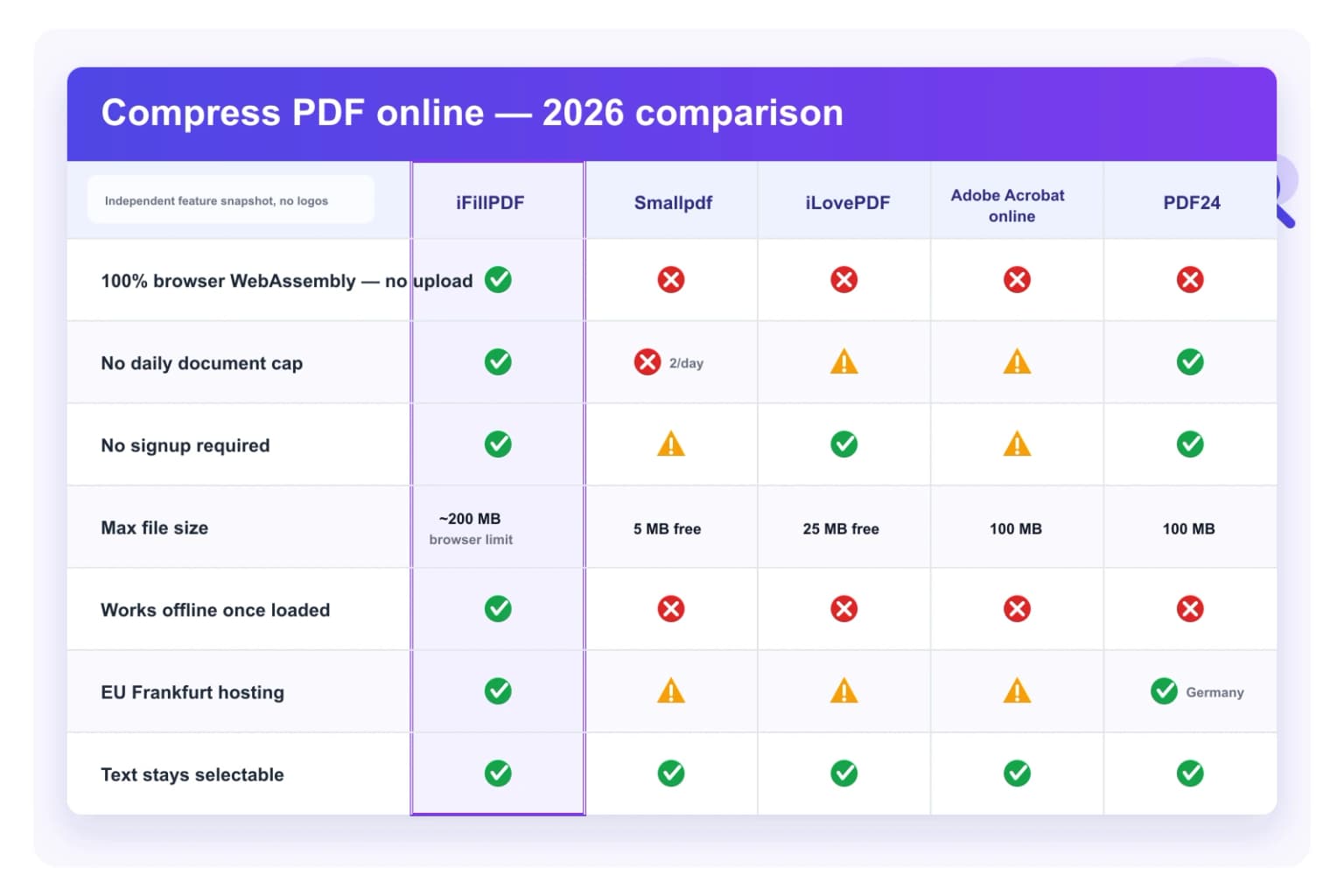
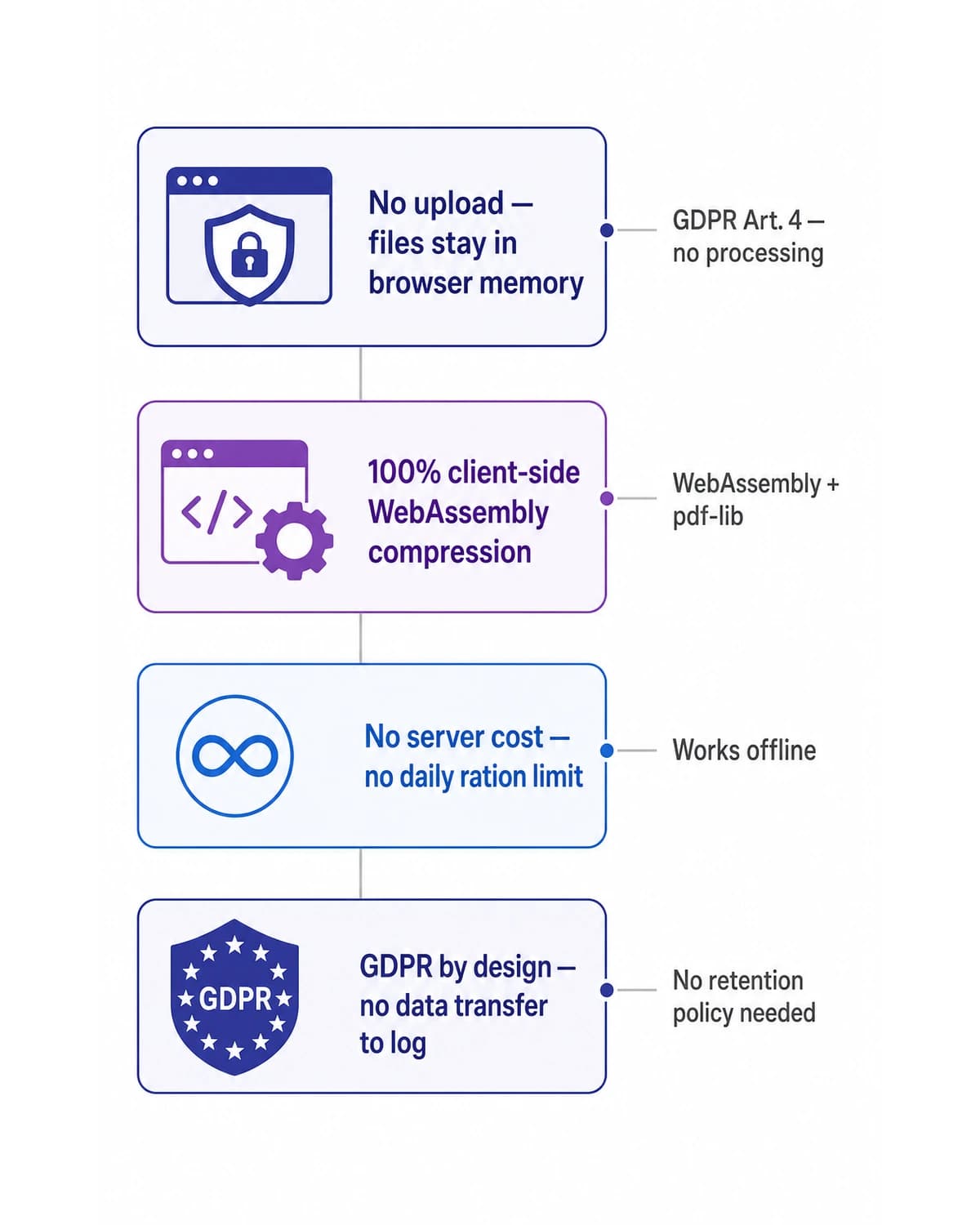
Your PDF never touches a server. Processing runs in your browser via WebAssembly + pdf-lib under ISO 32000-2:2020. Smallpdf, iLovePDF, Adobe Acrobat online, PDF24, Sejda, Foxit, Soda PDF, CloudConvert and ILoveImg all upload to…
No daily quota, no signup, no credit card
Smallpdf caps the free tier at 2 documents per day (Pro $9/mo to lift). Sejda caps at 3 tasks per hour and 50 MB per file ($7.50/mo Premium). Adobe Acrobat online requires Adobe ID after 2 free compressions.…
Structural compression, not image compression — and why that matters
This tool rewrites the PDF object structure into compact object streams and drops document metadata. It does not open, downsample or re-encode a single embedded image.…
GDPR-by-design + Hetzner Falkenstein TADPF — anti Cloud Act
No file leaves your device, so there is no data transfer to log under GDPR Art. 30, no processor agreement to sign under GDPR Art. 28, no Transfer Impact Assessment to file under GDPR Art. 46.…
Text stays selectable, images keep full quality
Nothing in your page content is re-encoded: the text layer, embedded font subsets, hyperlinks, bookmarks, page labels, ICC color profiles and every raster image come out byte-identical, so Ctrl+F still works and a scan stays as…
Beats Adobe Acrobat and Smallpdf on speed (no AWS round-trip)
A typical 50-page contract with embedded scans compresses in under 5 seconds on a mid-range laptop (M1 MacBook Air or 2020+ Intel ThinkPad).…
Metadata stripping before you send a file out
The single most useful thing this tool does for most people is not size at all: Medium and Strong clear the document Info dictionary — title, author, subject, keywords and producer.…
Technical details
Rewrite any PDF in a more compact form, entirely in your browser, with three levels — Light (object-stream rewrite only), Medium (also clears title, author, subject, keywords and producer metadata) and Strong (also flattens interactive form fields into static content). Be clear about what this is: a structural compressor. It rewrites the file layout with pdf-lib object streams and drops document metadata; it does not touch your embedded images at all — no downsampling, no JPEG re-encoding, no JBIG2. That means text-heavy PDFs and files exported by older tools shrink noticeably, while a PDF that is 95% scanned photographs will barely move. For heavy image compression, use the AI in the documents workspace instead. No upload, no signup, no Smallpdf 2-document-per-day free-tier cap ($9/mo Pro), no iLovePDF Premium $7/mo 25 MB ceiling, no Adobe Acrobat Pro $19.99/mo, no Sejda $7.50/mo 50 MB free cap, no Foxit $9.99/mo, no Soda PDF $7.99/mo, no PDF24 100 MB cap, no CloudConvert $9.99/mo, no ILoveImg $4/mo, no PDF Compressor (the free site) without quality control. Text stays selectable and every image keeps its original quality, GDPR-by-design and TADPF-aligned (Hetzner Falkenstein eu-central-1) — outside the reach of the US Cloud Act and 50 USC §3024. Fit for IRS e-filing 5 MB attachment limit, USCIS 25 MB upload cap and ESIGN Act 15 USC §7001 retained records.
Previews and proof
Go further with lifetime access
E-signature proof log, business templates, no watermark. $8.99, one payment, for life — no subscription.
Frequently asked questions
How do I compress a PDF to under 25 MB for Gmail?+
Drop your file, pick Medium or Strong, and check the before/after size the tool shows you. Honest expectation-setting: this compressor rewrites the file structure and strips metadata, it does not touch images — so if your PDF is over 25 MB because it is full of scans, it will probably still be over 25 MB afterwards. What actually works in that case: split the document into two or three parts with our splitter and send two emails, or run it through the AI in the documents workspace, which does re-encode images. Gmail (consumer and Workspace) caps at 25 MB, Outlook.com / Microsoft 365 and iCloud Mail at 20 MB. Text-heavy documents — legal briefs, reports, exports from older tools — are where the structural rewrite genuinely pays off.
How do I compress a PDF to 1 MB, 500 KB, 200 KB or 100 KB?+
You cannot hit a specific byte target with this tool, and we would rather say so than let you upload a file and find out. There is no target-size mode and no image downsampling: you pick a level, the file is rewritten, and you see what you get. If a portal demands 500 KB and your document is a colour scan, the physics are unforgiving â reaching that size means grayscale at 72 DPI with heavy JPEG loss, and the text goes blurry. The realistic routes are: convert the pages to JPG at 72 or 150 DPI and rebuild the PDF, split the document, or use a compressor that re-encodes images. Smallpdf ($9/mo Pro), Pi7, Zamzar and PDFgear all advertise “compress to 1 MB” and make exactly that quality trade-off behind a vague slider.
Is it really 100% free with no daily limit?+
Yes. No signup, no credit card, no 2-documents-per-day cap (the Smallpdf free-tier limit), no 3-tasks-per-hour cap (Sejda free), no Adobe ID required after 2 compressions (Adobe Acrobat online). Compress hundreds of files in a row if you need to. The whole tool runs in your browser via WebAssembly, so we have no server cost to ration. Adobe Acrobat Pro is $19.99/mo, Smallpdf Pro $9/mo, iLovePDF Premium $7/mo, Sejda Premium $7.50/mo, Foxit $9.99/mo, Soda PDF $7.99/mo, CloudConvert $9.99/mo, ILoveImg $4/mo.
Is my PDF uploaded to your servers?+
Your PDF stays in your browser: iFillPDF compresses entirely client-side using WebAssembly + pdf-lib under ISO 32000-2:2020. Your file never leaves your device — not to us, not to AWS US-East-1, not to anyone. Competitors (iLovePDF, Smallpdf, PDF24, Adobe Acrobat online, Sejda, Foxit, Soda PDF, CloudConvert) all upload to their servers. Even when the page has loaded you can disconnect the network cable and keep compressing — the WebAssembly engine runs offline.
Will the text stay selectable, hyperlinks clickable and form fields intact?+
Text and hyperlinks: yes, untouched, Ctrl+F still finds your terms. Images: untouched too, at full original resolution, because this compressor never opens them. Form fields: yes on Light and Medium, no on Strong — Strong deliberately flattens interactive fields into static page content, which is what makes it the smallest option and also what makes the form no longer fillable. Document metadata: cleared on Medium and Strong by design. Digital signatures: invalidated, because re-saving a PDF rewrites the byte ranges the signature covered. If your file is signed and must stay signed, do not compress it.
How much smaller will my PDF actually be?+
It depends entirely on what is making your file big, and the answer is often “not much” â which is why the tool shows you the before and after size instead of promising a percentage. Files whose weight is structure (documents exported by older tools, PDFs assembled from many sources, forms with heavy metadata) can lose a real slice. Files whose weight is images — scanned contracts, photo portfolios, PowerPoint exports — barely move, because the images are copied across untouched. Foxit, Smallpdf and Adobe Acrobat advertise “up to 99%” compression; that number comes from re-encoding images at low quality on uncompressed scans straight out of a Xerox or Brother MFP, and it is not what this tool does.
Is this GDPR-compliant and safe for HIPAA / attorney-client privilege?+
It is GDPR-by-design, not just compliant. Because no personal data ever leaves your device (the compressor runs in your browser via WebAssembly), there is no data transfer to log under GDPR Art. 30, no processor agreement to sign under GDPR Art. 28, no Transfer Impact Assessment to file under GDPR Art. 46. Static assets and any optional account data sit in Frankfurt eu-central-1 (Hetzner Falkenstein, ISO 27001-aligned, TADPF) — outside the reach of the US Cloud Act and 50 USC §3024. HIPAA BAA available with the Lifetime offer for orgs that want a paper trail. Even EU-hosted competitors still process your file on their infrastructure; iFillPDF keeps the split in your browser tab. Material risk reduction for FRCP Rule 34 ESI productions, attorney-client privileged material, HIPAA PHI and trade secrets.
What is the maximum file size?+
100 MB — the drop zone rejects anything larger, and below that your browser memory is the practical ceiling since everything runs in the tab. Smallpdf caps free users at 5 MB (Pro $9/mo to lift), iLovePDF at 25 MB (Premium $7/mo), Sejda at 50 MB and 200 pages free, Adobe Acrobat online at 100 MB, PDF24 at 100 MB — the same ceiling as ours, without the upload.
Does it work offline?+
Yes — once the iFillPDF page has loaded, you can disconnect from the internet and keep compressing. The WebAssembly engine runs entirely in your browser tab. Try that with iLovePDF, Smallpdf, PDF24, Adobe Acrobat online, Sejda, Foxit, Soda PDF or CloudConvert — all of them require a live connection to upload your file to their server.
Prepare a PDF for upload or email
More PDF tools
Keep going with a related tool — try without signing up, free account to download.