Convert JPG and PNG images to a single PDF
Turn JPG, PNG and WebP photos into one PDF in your browser. A4/Letter/Legal/fit sizing, adjustable margin, reorder before binding. Free, no signup, EU Frankfurt.
How it works
Drop your images
JPG, JPEG, PNG and WebP, up to 50 MB each — drop one photo or a hundred at once, and add more later without losing the ones already queued.…
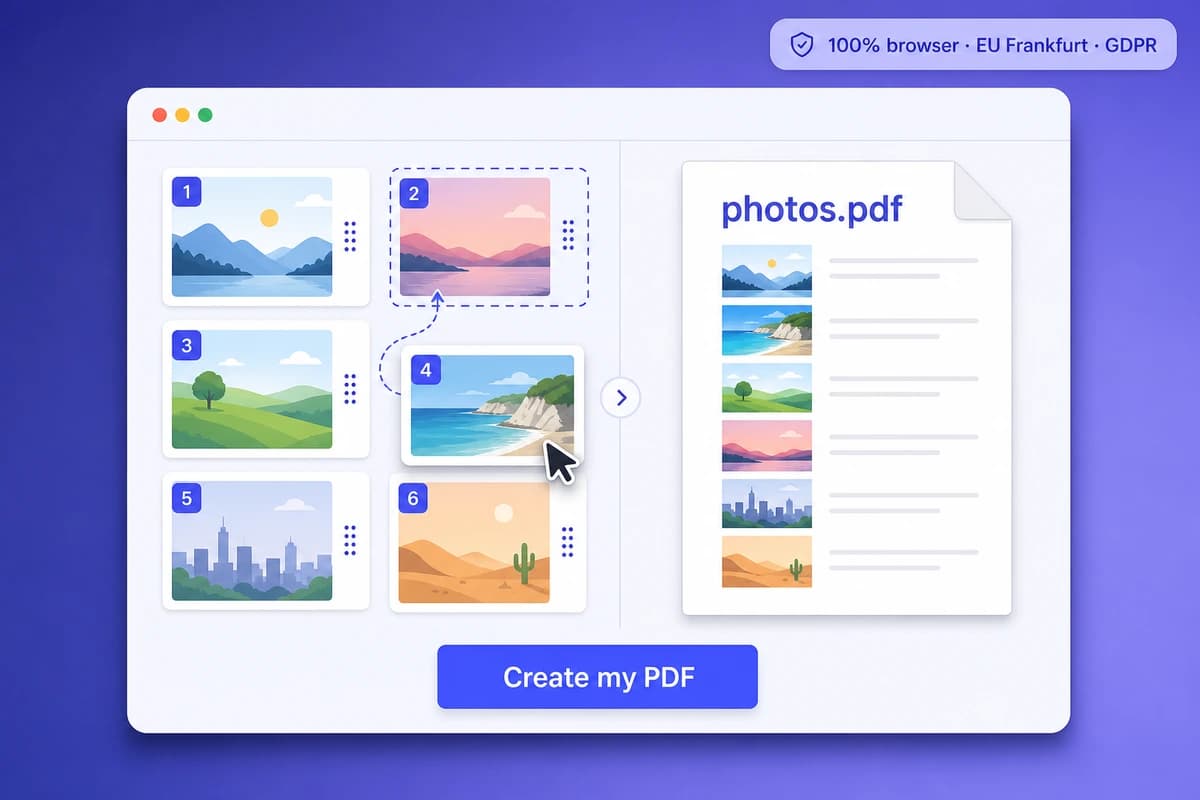
Set the order, page size and margin
Move each image up or down to set the order they will be bound in. Pick A4 (210x297 mm), US Letter (8.5x11 in), Legal (8.…
Download a single PDF
pdf-lib binds your photos into one standard PDF that opens identically in Adobe Reader, macOS Preview, Foxit, Edge and Chrome.…
Why choose iFillPDF
JPEG, PNG and WebP — and what to do about HEIC
The converter takes JPG, JPEG, PNG and WebP up to 50 MB each. It does not take HEIC, the iPhone default since iOS 11, and we would rather tell you here than let you drag twenty files into a drop zone that rejects them: open the…
100% browser — pdf-lib client-side
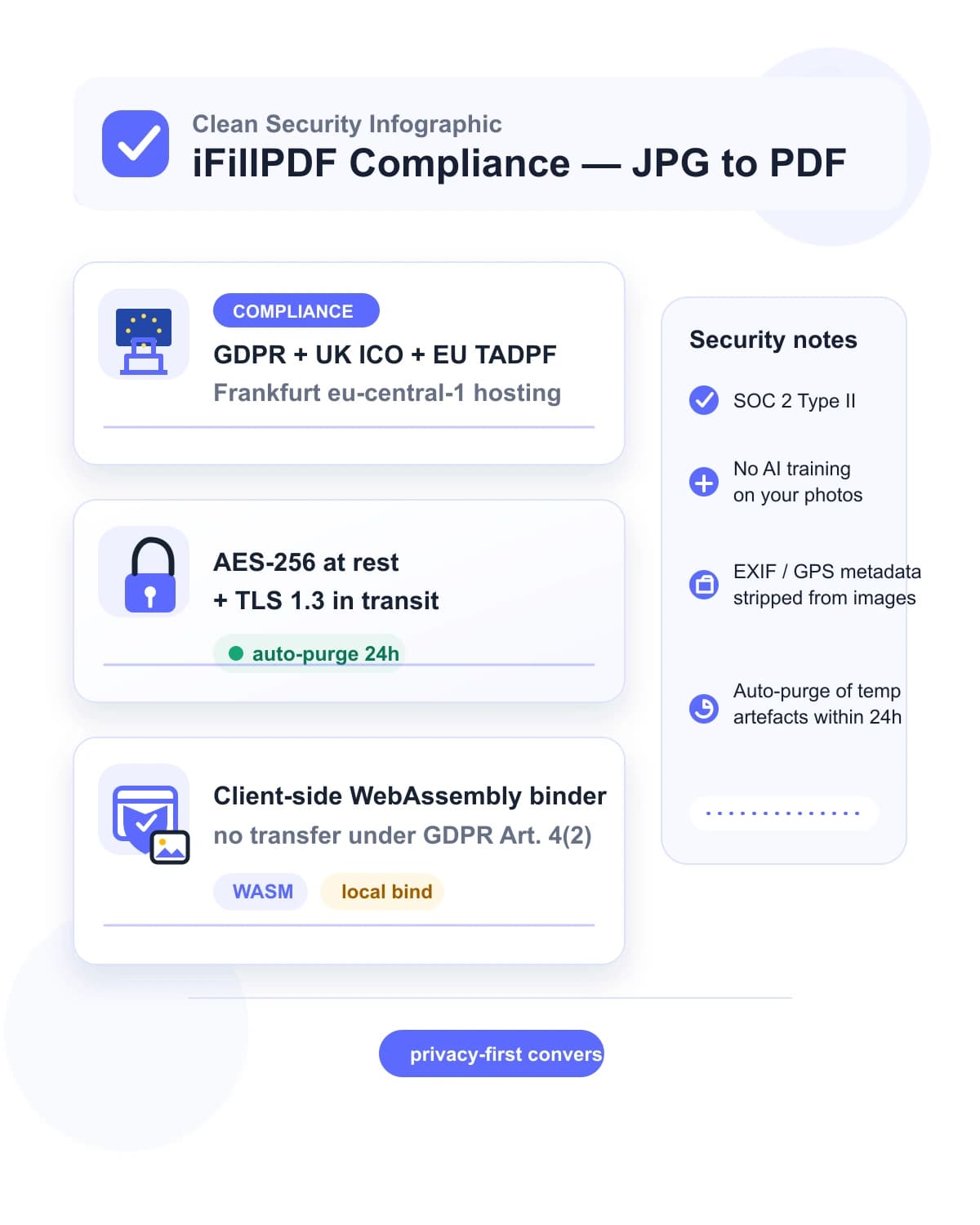
Conversion runs entirely in your browser via pdf-lib (MIT) — your photos never leave the device under GDPR Art. 4(2) (no transfer = no processing by us). Adobe, Smallpdf, iLovePDF, jpg2pdf.…
A hundred images in one pass — no per-batch cap
Convert one photo or a hundred in a single pass, adding more files to the queue as you go without losing your order. Each image can be up to 50 MB; the number of them is limited only by your device memory, since the work happens…
No re-encoding — and what that means for EXIF
JPEG images are embedded into the PDF exactly as they arrived, byte for byte, with no re-compression: your photo in the PDF is the photo you dropped, at full quality and with its colour profile intact.…
EU Frankfurt hosting when you save to the cloud
The conversion itself never touches a server. If you take the $8.99 one-time Lifetime offer for cloud-saved PDFs and shared workspaces, that storage sits on Hetzner Falkenstein eu-central-1 under the TADPF Trans-Atlantic Data…
Technical details
Drop JPEG or PNG receipts, scanned IRS Form W-9 captures or a hundred photos at once and get one PDF in a few seconds — entirely in your browser with pdf-lib. Set the order of the images before binding, pick A4 (210x297 mm), US Letter, Legal or fit-to-image page sizing, choose portrait or landscape, and dial the margin. Before you start, prep the photos for the cleanest PDF: export iPhone HEIC files as JPEG from Photos, and rotate any sideways shots before dropping them in so the pages bind in the right orientation. This converter brings your photos together in an image PDF. iFillPDF also uses AI-based OCR to recognize content in your documents. Unlike Adobe Acrobat Pro ($19.99/mo + Adobe ID sign-in even on the free online tool), Smallpdf ($9/mo Pro after a 2 free tasks/day cap), iLovePDF (free tier capped at 20 images per batch then Premium $9/mo), Canva Pro ($14.99/mo paywall to remove watermarks), pdfFiller ($20/mo Premium after 30-day trial), CamScanner (mandatory account + ad watermark on free) or jpg2pdf.com (server upload, 5 MB cap per file, 60-min retention): zero upload, no Adobe ID, no watermark, hosted on Hetzner Falkenstein eu-central-1 under TADPF EU-US Data Privacy Framework with zero Cloud Act 50 USC §3024 / FISA 702 exposure, AES-256-GCM at rest, TLS 1.3 in transit, SOC 2 Type II, ISO 27001:2022, files purged within 24h, never used to train AI.
Previews and proof
Go further with lifetime access
E-signature proof log, business templates, no watermark. $8.99, one payment, for life — no subscription.
Frequently asked questions
How is iFillPDF different from Adobe Acrobat, Smallpdf, iLovePDF, jpg2pdf.com, Canva and CamScanner for converting JPG to PDF?+
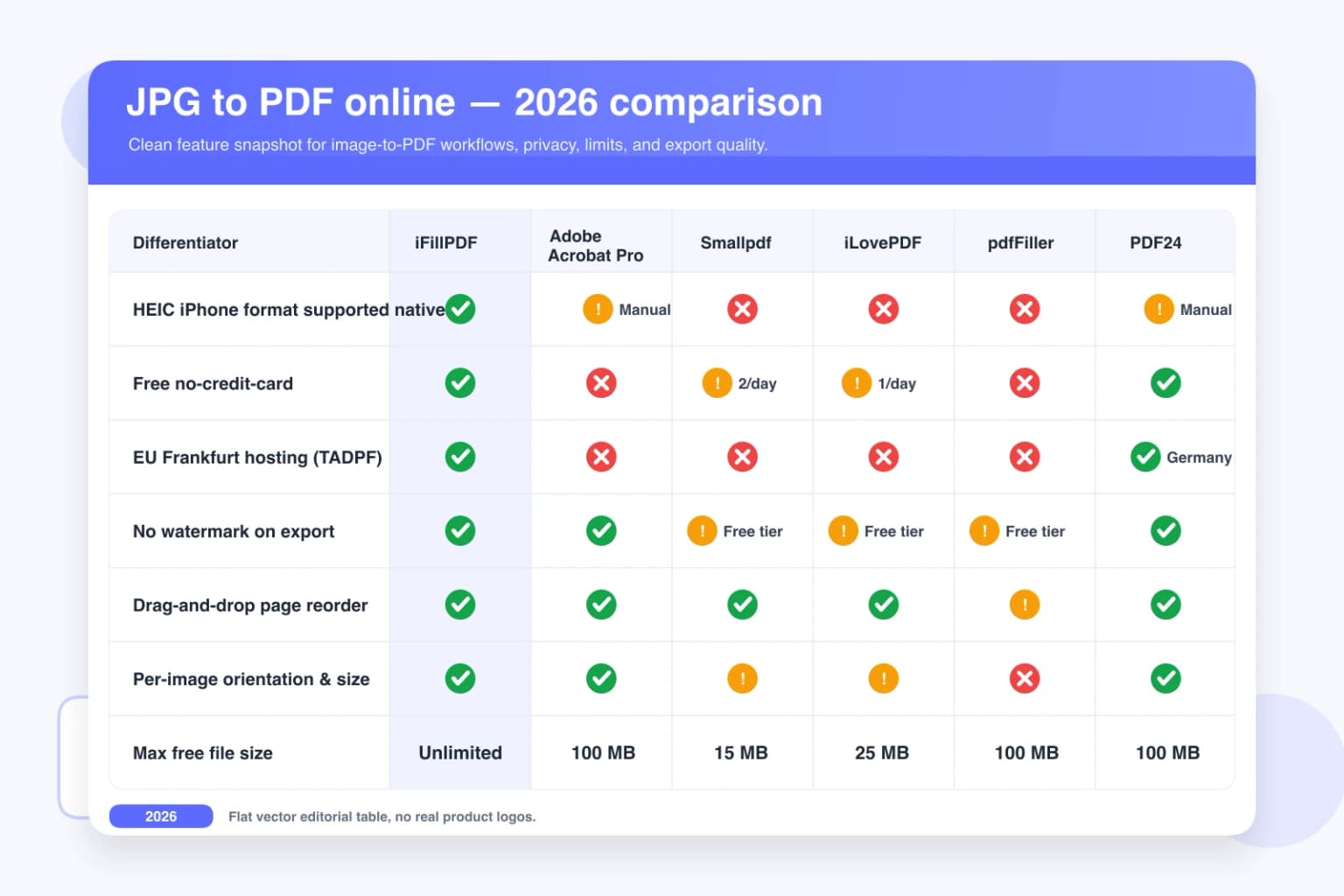
Five concrete differences: (1) Pricing — Adobe Acrobat Pro is $19.99/mo with mandatory Adobe ID sign-in even on the free online JPG-to-PDF tool, plus the free tier limits you to 2 conversions before forcing the 7-day trial; Smallpdf gates the free tier at 2 tasks per day across all 21 tools, then $9/mo Pro for batch; iLovePDF caps free at 20 images per batch then $9/mo Premium; Canva Pro is $14.99/mo to remove watermarks; pdfFiller is $20/mo Premium after a 30-day trial; CamScanner forces account creation and stamps an ad watermark on free; jpg2pdf.com is genuinely free but caps at 20 files and 5 MB per file with 60-min server retention. iFillPDF is fully free with no card and no signup, no batch cap, no file-size cap. (2) Formats — this is where we are behind, not ahead: iFillPDF takes JPEG, PNG and WebP only, so iPhone HEIC needs a JPEG export first; Adobe accepts JPEG/PNG/BMP/GIF/TIFF (also no HEIC); jpg2pdf.com adds SVG; iLovePDF is the one that handles HEIC directly, at $9/mo Premium. (3) Privacy — Adobe processes on AWS us-east-1 under Cloud Act 50 USC §3024 + FISA 702; Smallpdf hosts in Switzerland outside EEA (no automatic GDPR adequacy); iLovePDF on Spanish servers; pdfFiller and CamScanner on US AWS; jpg2pdf.com retains uploads for 60 minutes. iFillPDF runs PDF-lib + WebAssembly entirely in your browser — your photos never leave the device under GDPR Art. 4(2). (4) Metadata — nobody in this list strips EXIF, us included: JPEGs are embedded as-is, so GPS coordinates and camera serials ride into the PDF. Strip them from the images first if that matters. (5) Output — iFillPDF writes a plain standards-conformant PDF with your images embedded losslessly; there is no PDF/A archival mode and no OCR, so if IRS 26 USC §6001 retention rules push you toward a searchable archival file, add a dedicated step after conversion.
Can I convert iPhone HEIC photos to PDF without exporting to JPEG first?+
No — and there is no point pretending otherwise. The drop zone accepts JPEG, PNG and WebP; a .heic file straight from the Photos app will be rejected. The conversion takes about ten seconds: on iPhone, open the photos, tap Share, and AirDrop or save them — iOS converts to JPEG automatically when the destination does not support HEIC; on a Mac, select the images in Preview, then File > Export and choose JPEG, which handles a whole batch at once. Be aware the JPEG re-encode takes 10-bit HEIC down to 8-bit, so a little dynamic range is lost — unavoidable with any tool that does not read HEIC natively. Adobe Acrobat online has the same limitation (JPEG/PNG/BMP/GIF/TIFF, no HEIC), as does jpg2pdf.com; iLovePDF handles HEIC at $9/mo Premium, and HiPDF free caps at 5 MB per file and uploads to a server.
Are my photos uploaded to your servers? What about EXIF GPS data and metadata?+
No upload — that part is unambiguous. Conversion runs entirely in your browser via pdf-lib (MIT-licensed, 4M+ npm downloads a week), so your photos never leave the device under GDPR Article 4(2), and you can verify it yourself: open the Chrome DevTools Network tab during a conversion and you will see zero requests to ifillpdf.com. Metadata is the part where we will not flatter ourselves: JPEGs are embedded byte-for-byte, so EXIF GPS coordinates, camera serials, lens model, IPTC copyright tags and capture timestamps travel into the PDF intact. That is good for fidelity and bad for privacy, and it is the same behaviour as Adobe Acrobat online. If you are protecting a source, sharing listing photos or producing under FRCP Rule 34, strip the images first with Preview, the iOS share sheet or exiftool. For context on the alternatives: Smallpdf and iLovePDF retain uploads for up to 2 hours on their EU/CH servers, jpg2pdf.com for 60 minutes, and CamScanner was flagged by Kaspersky for embedding the Necro trojan in 2019 Android builds. If you take the $8.99 one-time Lifetime offer for cloud-saved PDFs and shared workspaces, hosting moves to Hetzner Falkenstein eu-central-1 under TADPF Trans-Atlantic Data Privacy Framework with AES-256-GCM at rest, TLS 1.3 in transit, SOC 2 Type II, ISO 27001:2022 — zero Cloud Act 50 USC §3024 / FISA 702 / Executive Order 14086 exposure.
How many images can I combine, and what is the maximum file size per image?+
No cap on the number of images; each file must be 50 MB or smaller, and beyond that your device RAM is the real limit since the work happens in your tab. A typical M1 MacBook Air handles a hundred 48MP JPEGs comfortably. By contrast: jpg2pdf.com caps at 20 files plus 5 MB per file; iLovePDF free caps at 20 images per batch (then Premium $9/mo for unlimited); Smallpdf caps at 2 free tasks per day across all 21 tools; Adobe Acrobat online does not publish a documented per-batch cap but enforces a 100 MB total upload limit. For very large batches we recommend splitting into two passes and using our PDF Merge tool afterward — both run client-side and chain in under a minute.
Can I scan paper documents (receipts, IRS forms, contracts) by photographing them and converting to a searchable PDF?+
You can turn them into a tidy PDF, but not a searchable one — worth separating those two things. Snap photos of a paper IRS Form W-9, receipts for a Schedule C deduction, a signed NDA or 1099-NEC backup, export them as JPEG, drop them in, and you get one PDF in a few seconds with each photo centred on an A4 or Letter page. What you will not get is OCR: there is no text layer, so the result is not searchable, not selectable and not an archival PDF/A file. If a retention rule points you at a searchable archive — IRS 26 USC §6001, 17 CFR §232.302 SEC EDGAR, HIPAA 45 CFR §164.316(b)(2) — run the PDF through a dedicated OCR tool afterwards. Two things worth doing before you drop: rotate any sideways photo, since there is no EXIF auto-rotate here, and run the pages through Microsoft Lens or the Apple Notes document scanner if you want perspective correction and deskew.
More PDF tools
Keep going with a related tool — try without signing up, free account to download.