Fillable lease agreement — fill, sign and download free
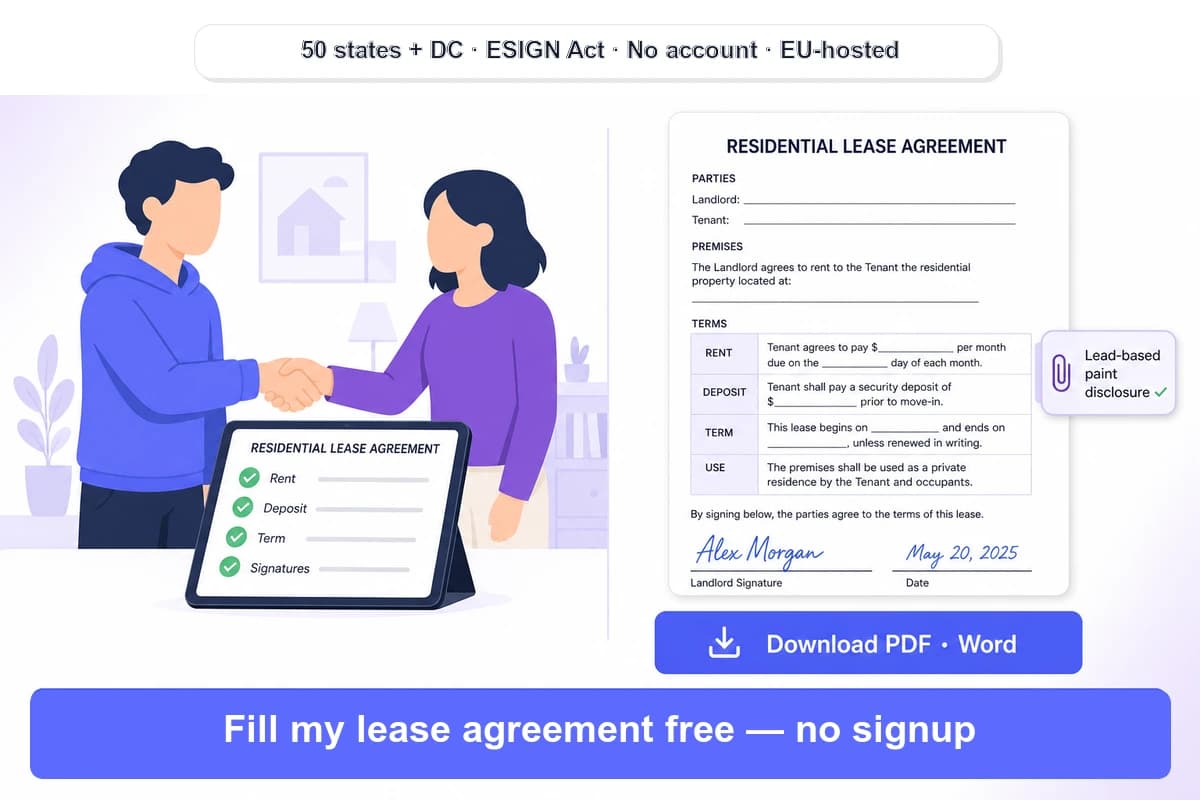
Fill a residential lease agreement online free — AI maps every field (rent, deposit, term, lead-paint disclosure). 50-state ready, e-sign, no account. PDF & Word.
How it works
Upload your lease agreement PDF
Drag-and-drop or browse for any residential lease agreement: a standard 12-month fixed-term lease, a simple 1-page rental agreement, a month-to-month tenancy, a room rental / sublease, or…
AI auto-detects every field in ~600 ms
A vision pass scans the lease and proposes every fillable field with the correct tab order: landlord and tenant full names, property address and unit, monthly rent amount and due date,…
Type, e-sign and download
Fill each detected field in tab order, then add your signature — typed, drawn or uploaded as an image — for the landlord, the tenant and any co-signer or guarantor.…
Why choose iFillPDF
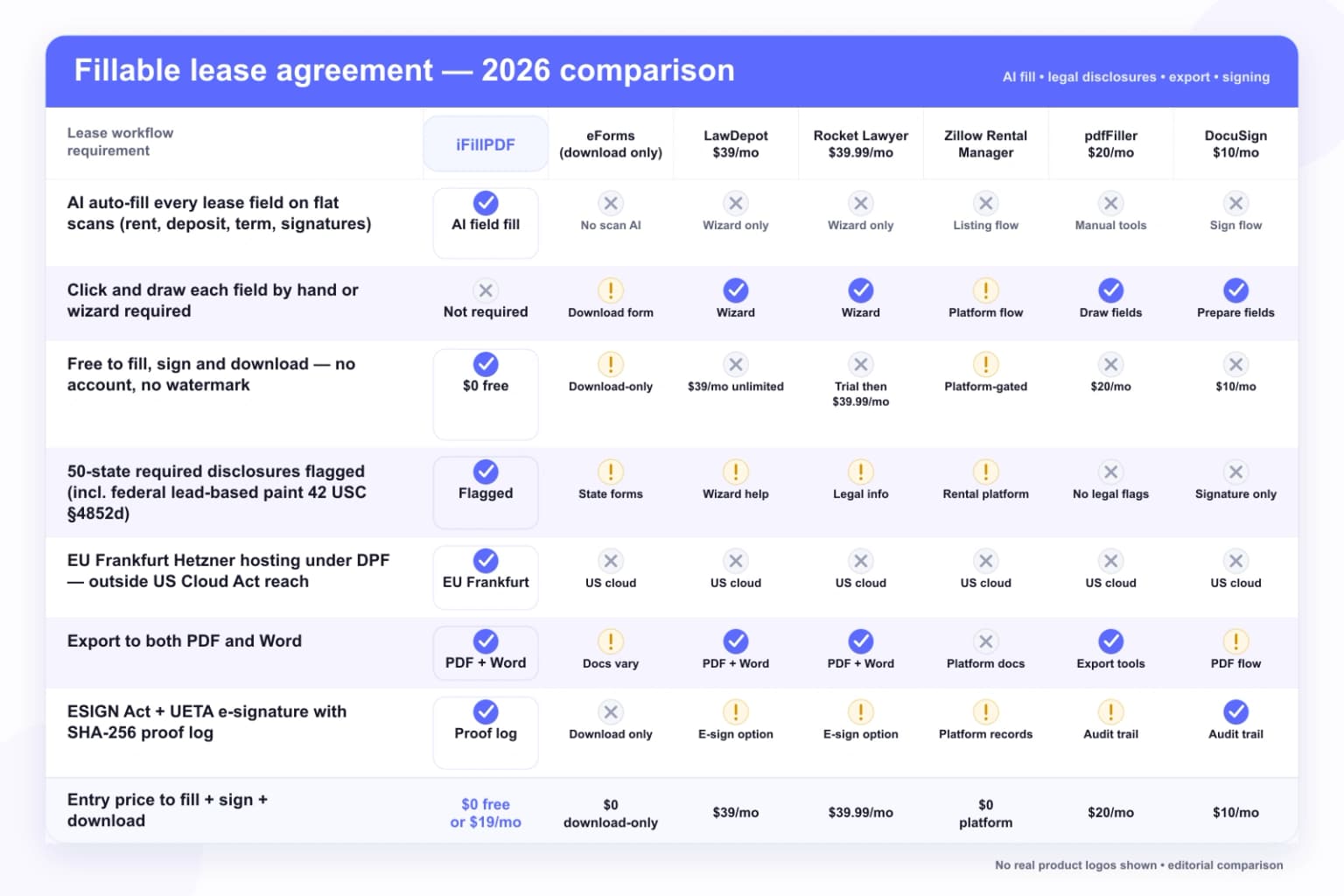
AI auto-fill — no clicking each field on flat-scan leases
Most state lease forms (the Texas Residential Lease Agreement, official county housing-authority PDFs, and most attorney-drafted contracts) ship as flat scans with no AcroForm layer at all.…
50-state ready — required disclosures flagged
There is no federal residential lease in the United States: a lease agreement is a private contract between landlord and tenant governed by each state's landlord-tenant statute (×50 + DC), so the clauses and disclosures that are…
Every clause a standard lease needs — pre-mapped
A complete residential lease agreement covers the parties (landlord, tenant, property manager and any co-signer/guarantor), the property description (address, unit, bedrooms, bathrooms, amenities), the lease term (a 12-month fixed…
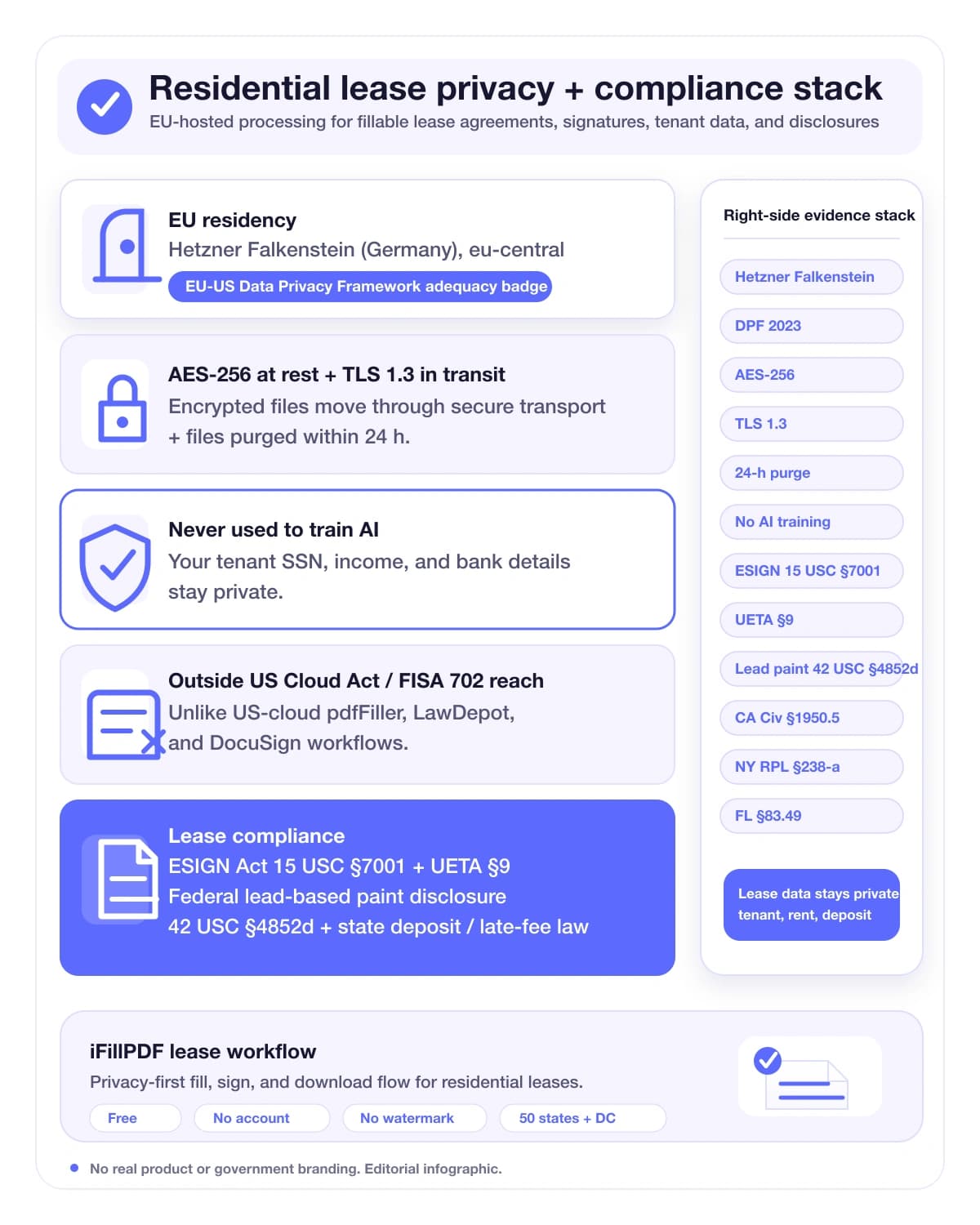
Free, no account, watermark removed on paid plans — your data stays in the EU
Filling a lease is free with no signup wall, though the free output carries a watermark removed on any paid plan — unlike pdfFiller (paywalls fillable forms at $20/mo) and the wizard sites that require an account before you can…
Technical details
Drop any US residential lease agreement — a standard fixed-term lease, a simple 1-page rental agreement, a month-to-month tenancy or your state's official form (Texas, California, New York, Florida and 46 others) — and our AI vision pass maps every fillable field for you in ~600 ms: landlord and tenant names, property address, monthly rent and due date, security deposit, lease term start and end dates, late fees, utilities, pet rules and the signature and date blocks. It works even on flat scans with no AcroForm layer — the exact case where eForms, LawDepot ($39/mo unlimited), Rocket Lawyer ($39.99/mo), Zillow Rental Manager and pdfFiller ($20/mo) make you click and draw each box by hand or force you through a paywalled wizard. Remember there is no single federal lease in the United States — a residential lease agreement is a private contract governed by each state's landlord-tenant law (×50), so we flag the disclosures the law requires, including the federal lead-based paint disclosure (42 USC §4852d) for any home built before 1978, plus state-specific security-deposit caps and late-fee grace periods. Type into every field, add a legally binding e-signature under the ESIGN Act (15 USC §7001) and UETA §9, and download a flattened, print-ready PDF — or export to Word. No account; the free version adds a watermark removed on paid plans; hosted on Hetzner Falkenstein in the EU under the EU-US Data Privacy Framework, with zero Cloud Act reach over the SSN, income and banking details on your lease.
Previews and proof
Go further with lifetime access
E-signature proof log, business templates, no watermark. $8.99, one payment, for life — no subscription.
Frequently asked questions
Is the fillable lease agreement really free?+
Yes — you can upload a residential lease agreement, let the AI auto-fill the fields, type in the rent, deposit and term, add an e-signature and download a flattened PDF for free, with no account; the free output carries a watermark removed on any paid plan. That is different from pdfFiller (which paywalls fillable forms at $20/mo Premium), LawDepot ($39/mo for unlimited documents after a paywalled preview), Rocket Lawyer ($39.99/mo, or a 7-day trial), and DocuSign (from $10/mo). Paid iFillPDF plans start at $8.99/mo and remove the watermark plus add saved templates and signed-copy storage — but filling and signing a single lease costs nothing.
Is there one standard federal lease agreement for all 50 states?+
No. There is no single federal residential lease in the United States. A lease agreement is a private contract between a landlord and a tenant, and it is governed by each state's landlord-tenant law (50 states + Washington D.C.). That means mandatory clauses and disclosures change at the state line — for example, security-deposit caps and itemization rules (California CA Civ §1950.5, Florida Fla. Stat. §83.49), late-fee grace periods (New York RPL §238-a bars a late fee before the 6th day), and witness requirements (Florida §689.01 needs two witnesses for leases over one year). The one nationwide rule is the federal lead-based paint disclosure (42 USC §4852d) for pre-1978 housing. Start from your state's template, then fill it here.
Can I write and fill out my own lease agreement without a lawyer?+
Yes. You can write and fill your own residential lease agreement — a lawyer is not required to make it legally binding. A complete lease should name the parties, describe the property, set the lease term and rent (amount, due date, late fee), state the security deposit, split utilities, list any appliances or furnishings, set pet and smoking policies, and include the federal lead-based paint disclosure for pre-1978 housing. iFillPDF auto-detects each of these fields so you don't leave one blank. If your situation is unusual (a high-value property, a commercial use, an out-of-state owner), it's reasonable to have a lawyer review the final document before both parties sign — but for a standard rental, filling a state-appropriate template yourself is the norm.
What information do I need to fill out a residential lease agreement?+
A standard lease needs: (1) tenant and landlord full names and contact addresses; (2) the rental property description (address, unit, bedrooms, bathrooms, amenities); (3) the lease term — start and end dates (a 12-month fixed term is the most common, used in about 87.68% of fixed-term leases per the 2022 BLS Housing Study); (4) the monthly rent, due date, accepted payment methods and late/NSF fees; (5) the security deposit amount and return rules; (6) the utilities and services split; (7) policies for pets, smoking, guests and maintenance responsibilities; and (8) signatures and dates for both parties. iFillPDF's AI maps all of these so you can type straight into each field.
Is the lead-based paint disclosure required on my lease?+
Only for older housing. Under the federal Residential Lead-Based Paint Hazard Reduction Act (42 USC §4852d) and EPA/HUD rules (24 CFR Part 35), any residential lease for housing built before January 1, 1978 must include a lead-based paint disclosure and give the tenant the EPA's "Protect Your Family From Lead in Your Home" brochure. For housing built in 1978 or later, the lead disclosure is not required. This is the one disclosure that applies in all 50 states; most other lease disclosures (deposit handling, mold, bed bugs, smoking) are set by individual state law. iFillPDF flags the lead-paint fields so landlords renting older homes don't omit a federally required attachment.
Is the e-signature on my lease legally binding?+
Yes, in nearly all cases. Under the federal ESIGN Act of 2000 (15 USC §7001) and UETA §9 (adopted by 49 states + DC; New York follows its own ESRA), an electronic signature on a residential lease has the same legal force as ink, provided three things are provable: the signer's intent to sign, attribution to the signer, and the integrity of the signed document. iFillPDF captures all three in a SHA-256 proof log (signer name, timestamp, document hash) admissible under FRCP Rule 34 and FRE Rule 902. Both the landlord and the tenant — plus any co-signer or guarantor — can sign electronically. Note that a handful of documents (wills, court orders) are carved out of ESIGN, but a standard residential lease is not.
Can I fill a state-specific lease — Texas, California, New York, Florida?+
Yes. Upload any state form — the Texas Residential Lease Agreement, a California lease (subject to CA Civ §1947.5 smoking disclosure and §1950.5 deposit rules), a New York lease (RPL §238-a 5-day late-fee grace), a Florida lease (§83.49 deposit escrow; §689.01 two-witness rule over one year), or a form from any of the other 46 states + DC — and the AI maps its fields the same way. Because lease law is state-specific, start from a template built for your state, then fill, sign and download it here. We're building a state-by-state lease guide so each form's required disclosures and deposit/late-fee limits are spelled out before you fill.
How is my lease data protected — does it leave the EU or train AI?+
A lease holds sensitive personal data: tenant SSN, income, employer, bank details and emergency contacts. iFillPDF processes and stores your file on Hetzner Falkenstein (eu-central, Germany) under the EU-US Data Privacy Framework, with AES-256 encryption at rest, TLS 1.3 in transit, and files purged within 24 hours. Your lease is never used to train any AI model. EU residency keeps the document outside the reach of the US Cloud Act, FISA 702 and related disclosure powers — a real difference from US-cloud-hosted tools like pdfFiller, LawDepot and DocuSign. For GDPR-covered landlords and EU property managers, this is also the compliant default.
Can I download the filled lease as PDF and Word, and print it?+
Yes. After filling and signing, download a flattened, print-ready PDF that opens identically in Adobe Reader, Apple Preview, Foxit, Edge and Firefox — ideal for printing two copies (one for the landlord, one for the tenant) and for archiving. You can also export an editable Word (.docx) version if you need to tweak a clause before final signing. The PDF preserves the layout exactly, so a lease you fill on your phone prints the same as one filled on a desktop.
More PDF tools
Keep going with a related tool — try without signing up, free account to download.