Fill out a W-4 online — free fillable IRS Form W-4
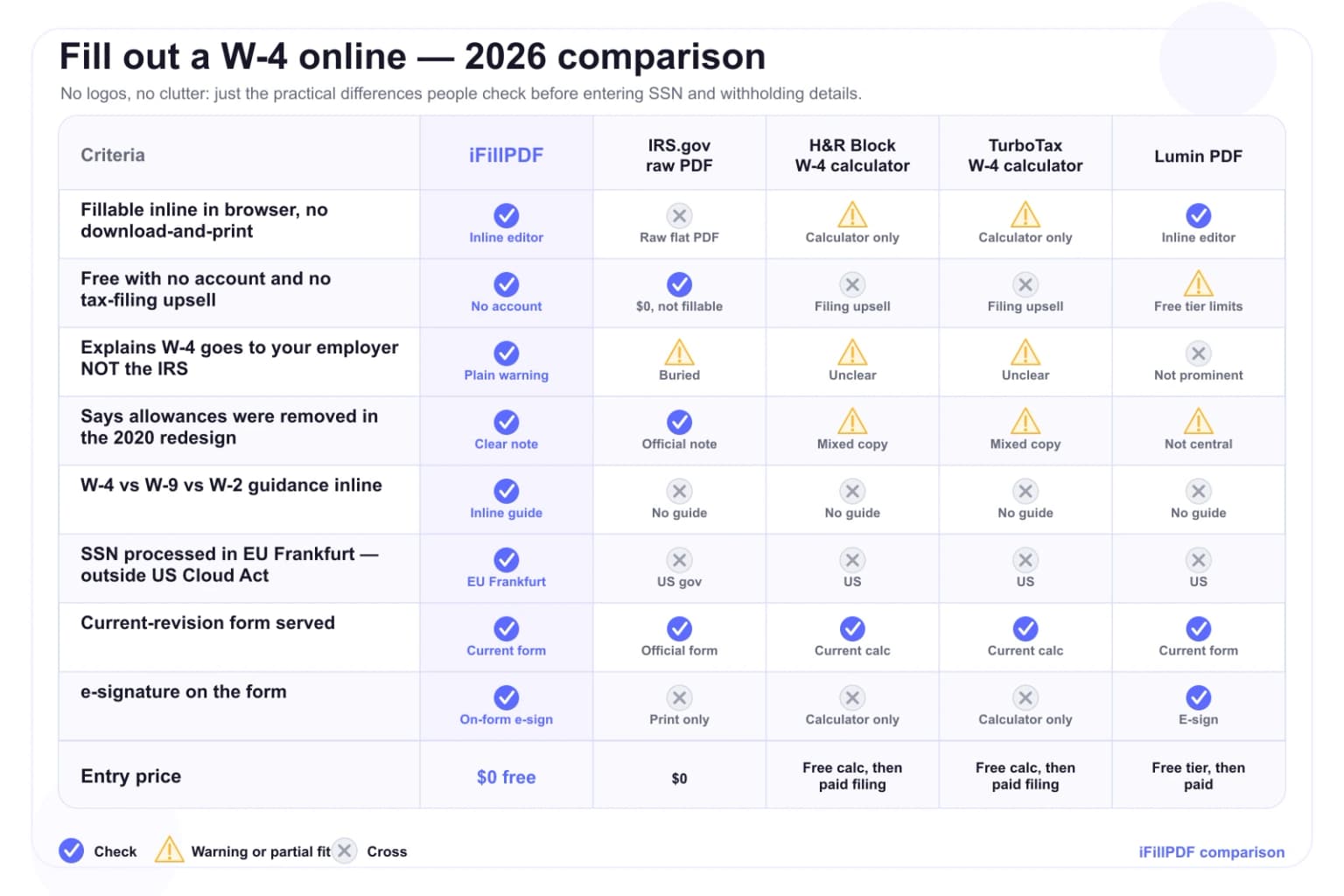
Fill out the IRS Form W-4 online free — 5 simple steps, no allowances, claim dependents, sign and give it to your employer (never the IRS). EU-hosted, no card.
How it works
Open the fillable IRS Form W-4
Load the official current-revision IRS Form W-4 (Employee's Withholding Certificate) in your browser — no need to download the raw irs.gov/pub/irs-pdf/fw4.pdf and print it.…
Work through the five steps
Only Step 1 (personal info + filing status) and Step 5 (sign and date) are required for everyone; Steps 2-4 fine-tune your withholding.…
Sign and give it to your employer
Draw, type or upload your signature in Step 5, export a flattened, print-ready PDF, and hand it to your employer or payroll department — not the IRS.…
Why choose iFillPDF
The W-4 goes to your employer, not the IRS — and allowances are gone
Two things trip people up on the W-4, and iFillPDF gets both right on the page. First: you never file a W-4 with the IRS. It is an instruction sheet for your employer's payroll, so the completed, signed form goes back to your…
Step 2 multiple jobs and Step 3 dependents — the parts that actually move your withholding
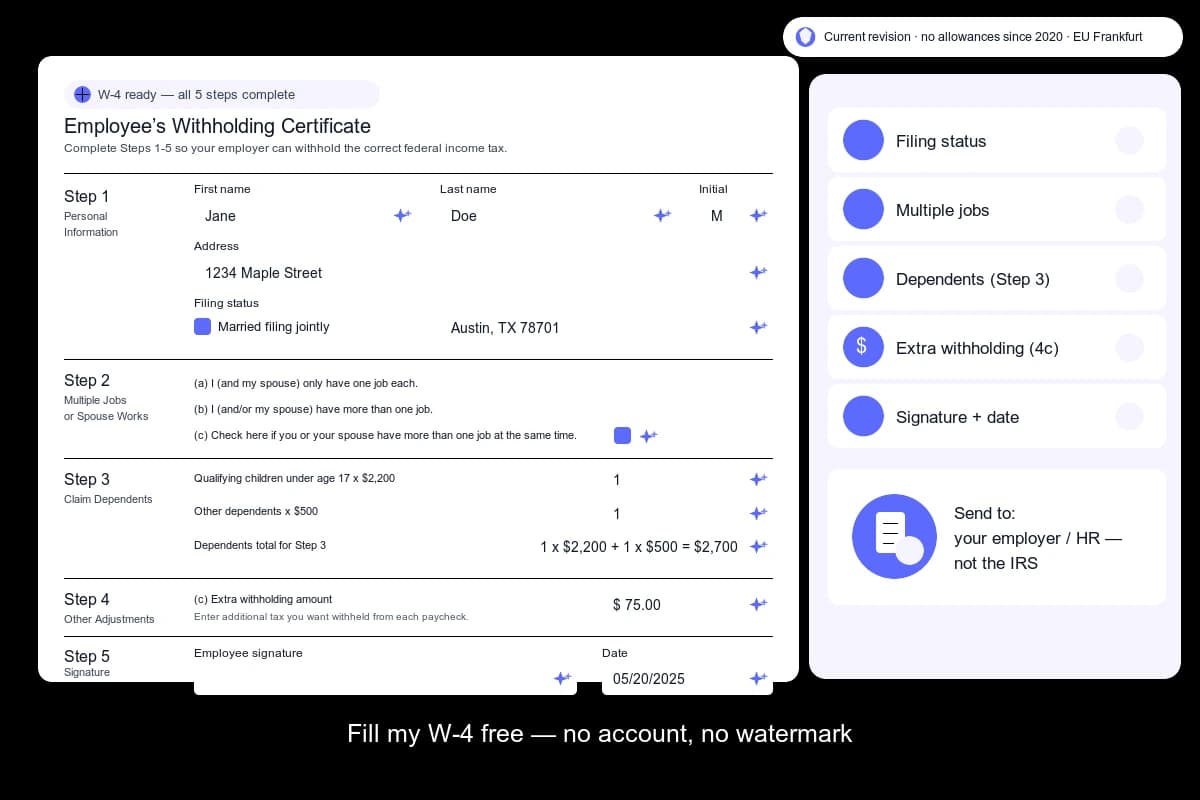
Steps 2 and 3 are where most under- or over-withholding happens. Step 2 handles the case where you hold more than one job or are married filing jointly with a working spouse: you pick one of three methods — (a) the IRS Tax…
W-4 vs W-9 vs W-2 — make sure you are filling out the right form
The W-4 is for employees only. If you are an employee, you complete a Form W-4 so your employer knows how much federal income tax to withhold from your pay.…
Your SSN never leaves the EU — Frankfurt hosting, no Cloud Act reach
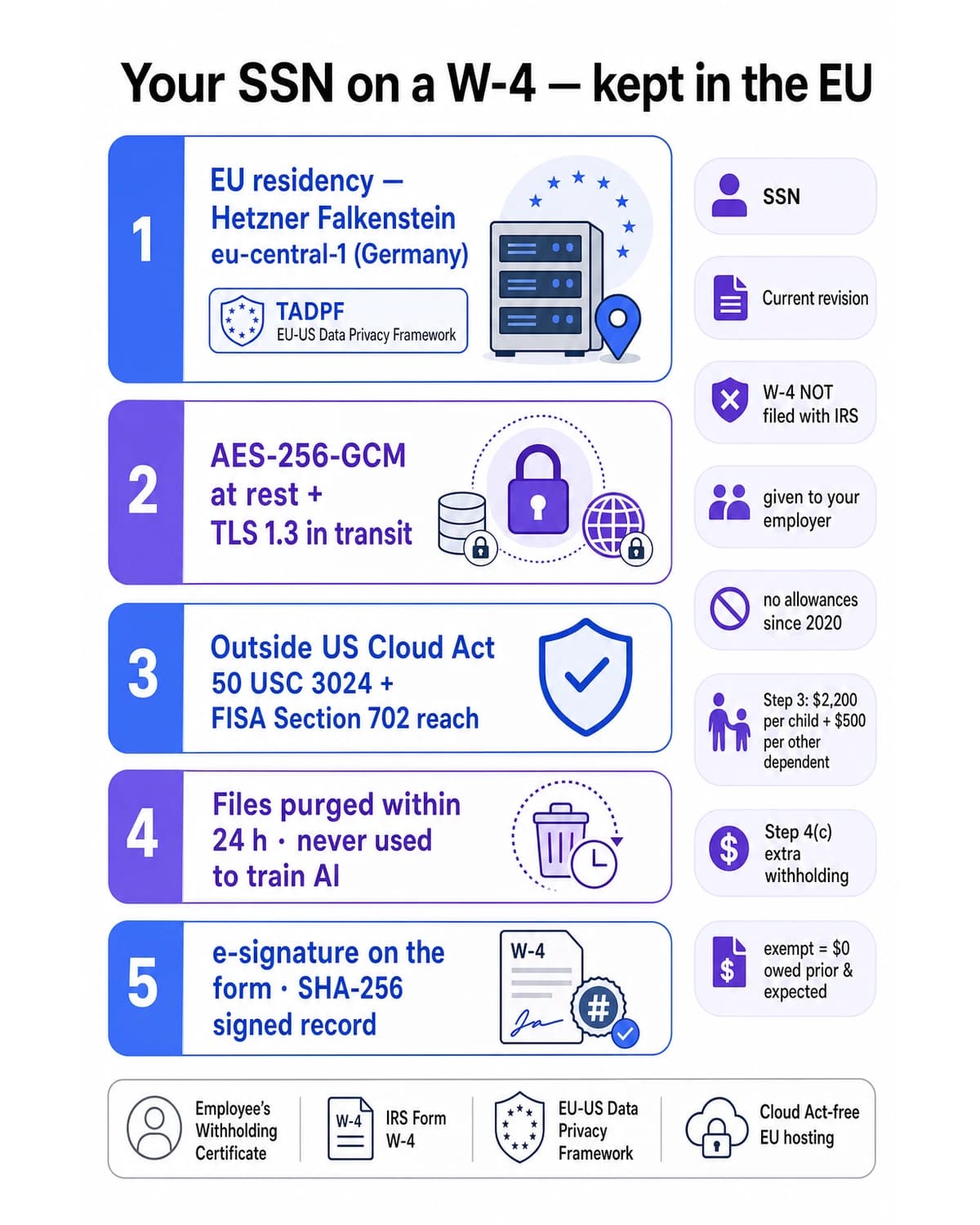
A W-4 carries your Social Security Number — exactly the data you do not want sitting in a US cloud subject to subpoena. iFillPDF processes and (optionally) stores your W-4 on Hetzner Falkenstein eu-central-1 in Germany, under the…
Technical details
Complete the official IRS Form W-4, Employee's Withholding Certificate, directly in your browser in five steps: enter your name, address and Social Security number and pick your filing status in Step 1 (Single or Married filing separately, Married filing jointly or Qualifying surviving spouse, or Head of household); account for multiple jobs or a working spouse in Step 2; claim the Child Tax Credit and the Credit for Other Dependents in Step 3; add other income, deductions or extra per-paycheck withholding in Step 4; then sign and date Step 5. The W-4 redesign that took effect with the 2020 form removed withholding allowances entirely — there is no longer a "claim 0" or "claim 1" line, so anyone copying old advice is filling out a form that no longer exists. Critically, you do NOT file a W-4 with the IRS: you give the completed form to your employer, who uses it to calculate how much federal income tax to withhold from each paycheck. iFillPDF auto-detects every field on the flat IRS PDF in about 600 ms, lets you e-sign it, and exports a clean, flattened PDF — all processed on EU servers in Frankfurt under the EU-US Data Privacy Framework, so the SSN you type never lands in a US datacenter within Cloud Act reach. No account and no calculator upsell — the free version adds a watermark, removed on paid plans.
Previews and proof
Go further with lifetime access
E-signature proof log, business templates, no watermark. $8.99, one payment, for life — no subscription.
Frequently asked questions
Do I file my W-4 with the IRS after filling it out?+
No. You never file a W-4 with the IRS. The W-4 is an instruction to your employer, so once you complete and sign it you hand it back to your employer or payroll department. They keep it on file and use it to calculate how much federal income tax to withhold from each of your paychecks. The IRS only sees the result later, on the Form W-2 your employer issues and on your annual tax return — not the W-4 itself.
Is it really free to fill out a W-4 online with iFillPDF?+
Yes. You can fill out the official IRS Form W-4, pick your filing status, claim dependents, sign and download a flattened PDF for free, with no credit card; the free version adds a watermark, removed on paid plans. There is no forced account just to access the form and no upsell into a paid tax-filing product. iFillPDF runs 100% in your browser for this form, and your SSN is processed on EU servers in Frankfurt — not a US datacenter.
How do I fill out a W-4 step by step?+
There are five steps. Step 1: enter your name, address, Social Security number and filing status (Single or Married filing separately; Married filing jointly or Qualifying surviving spouse; or Head of household). Step 2: if you hold more than one job or your spouse works, account for that using the IRS Tax Withholding Estimator, the Multiple Jobs Worksheet, or the 2(c) checkbox. Step 3: claim the Child Tax Credit and Credit for Other Dependents. Step 4: add other income, deductions, or extra withholding if you want. Step 5: sign and date. Only Steps 1 and 5 are required for everyone; Steps 2-4 fine-tune your withholding.
How do I claim 0 or 1 on the new W-4?+
You can't — and you don't need to. The W-4 was redesigned for 2020 and withholding allowances were removed entirely, so there is no longer a line to "claim 0" or "claim 1." Any guide telling you to do that is describing a pre-2020 form. To withhold more (the effect people wanted from "claiming 0"), add a flat dollar amount on Step 4(c) Extra withholding. To withhold less, claim dependents in Step 3 or deductions in Step 4(b). Your filing status in Step 1 also affects the rate.
How do I fill out a W-4 if I have a single job and no dependents?+
It is the simplest case. Complete Step 1 with your name, address, SSN and filing status (Single or Married filing separately if that applies), skip Steps 2, 3 and 4 entirely, then sign and date Step 5. Your employer will withhold at the standard rate for your filing status. You only need the middle steps if you have multiple jobs, a working spouse, dependents, or other income and deductions you want reflected in your paycheck.
How do I fill out a W-4 when I am married or my spouse works?+
Each of you completes your own W-4, but you should coordinate. In Step 2, account for the second income using one of three methods: the IRS Tax Withholding Estimator (most accurate), the Multiple Jobs Worksheet, or — if there are exactly two jobs of roughly equal pay — checking the box in Step 2(c) on both W-4s. Importantly, only one spouse should claim the dependents in Step 3 and the deductions in Step 4; claiming them on both forms under-withholds and usually means owing at tax time. Married filing jointly couples who earn about the same can also use the equal-pay checkbox to avoid over-withholding.
How does Step 3 (claiming dependents) work?+
In Step 3 you multiply your number of qualifying children under age 17 by $2,200 and your number of other dependents (for example a parent or an older child you support) by $500, then enter the combined total. That amount tells your employer to reduce your withholding to account for the Child Tax Credit and Credit for Other Dependents, so more of the credit reaches your paycheck during the year instead of waiting for your refund. If both spouses work, only the higher-paying job's W-4 should claim the dependents.
How do I claim exempt on a W-4?+
You can claim exemption from federal income tax withholding only if you owed no federal income tax last year and expect to owe none this year. To do it, complete Step 1, leave Steps 2-4 blank, write the word "Exempt" in the space below Step 4(c), then sign and date Step 5. An exemption is only good for one calendar year — you must submit a new W-4 claiming exempt early each year to keep it. Most working people do not qualify, so use this only if you genuinely expect zero federal income tax liability.
What is the difference between a W-4 and a W-9?+
A W-4, Employee's Withholding Certificate, is for employees and tells your employer how much federal income tax to withhold from each paycheck. A W-9, Request for Taxpayer Identification Number and Certification, is for independent contractors, freelancers and vendors — non-employees — and simply gives a payer your TIN so they can report payments to you on a 1099. A W-9 does not adjust any withholding. If a company treats you as an employee you fill out a W-4; if it treats you as a contractor you fill out a W-9.
Is my Social Security Number safe when I fill out a W-4 here?+
Yes. Your W-4 — including your SSN — is processed on Hetzner Falkenstein eu-central-1 in Germany, under the EU-US Data Privacy Framework, which keeps your data outside the reach of the US Cloud Act 50 U.S. Code §3024 and FISA Section 702. We use AES-256-GCM encryption at rest, TLS 1.3 in transit, purge files within 24 hours, and never use your document to train AI. When you send the completed W-4 to your employer, prefer a secure HR portal over plain email, since an SSN sitting in an inbox is a real exposure.
More PDF tools
Keep going with a related tool — try without signing up, free account to download.