TL;DR. You can add a watermark to a PDF for free using 5 tools (iFillPDF, Smallpdf, iLovePDF, PDF24, Sejda), with control over opacity, rotation and position — text everywhere, logo images on most of them. Each tool covers a different scenario: legal stamps, branded exports, draft markers, or CLI automation. Which one fits depends on whether you need image logos, EU hosting, or scriptable batches.

Why watermark a PDF (legal, branding, draft)
A watermark is a transparent text or image overlay printed on every page of a PDF. You add one to mark documents as Confidential, Draft, Sample, or Paid, or to brand exports with your company logo. The three dominant scenarios are:
- Legal: stamp contracts with "Draft" or "For Review Only" so recipients do not sign the wrong revision.
- Branding: place your logo on quotes, proposals, whitepapers and case studies before sharing externally.
- Leak deterrence: visible recipient name + date watermarks discourage forwarding of sensitive financial or HR documents.
Free tools cover all three, but they differ on opacity control, image vs text-only support, batch processing, and where your file is uploaded. Below are the five compared on those points.
Method 1 — Online tools (iFillPDF, Smallpdf, iLovePDF, PDF24, Sejda)
The fastest way to watermark a PDF for free is a browser tool — no install, drag and drop, download. Five mainstream options, compared on checkable capabilities rather than scores:
| Tool | Free | Text + Image | Custom Opacity | Rotation | Batch | EU Hosting |
|---|---|---|---|---|---|---|
| iFillPDF | Yes | Text only | 10–80% | −180° to +180° | No (one file, all its pages) | Frankfurt |
| Smallpdf | Limited | Text only (free) | Yes | Yes | Pro only | Switzerland |
| iLovePDF | Yes | Yes | Yes | Yes | Pro only | Spain |
| PDF24 | Yes | Yes | Yes | Yes | Yes | Germany |
| Sejda | 3/day, 200 pages | Yes | Yes | Yes | Limited | Netherlands |
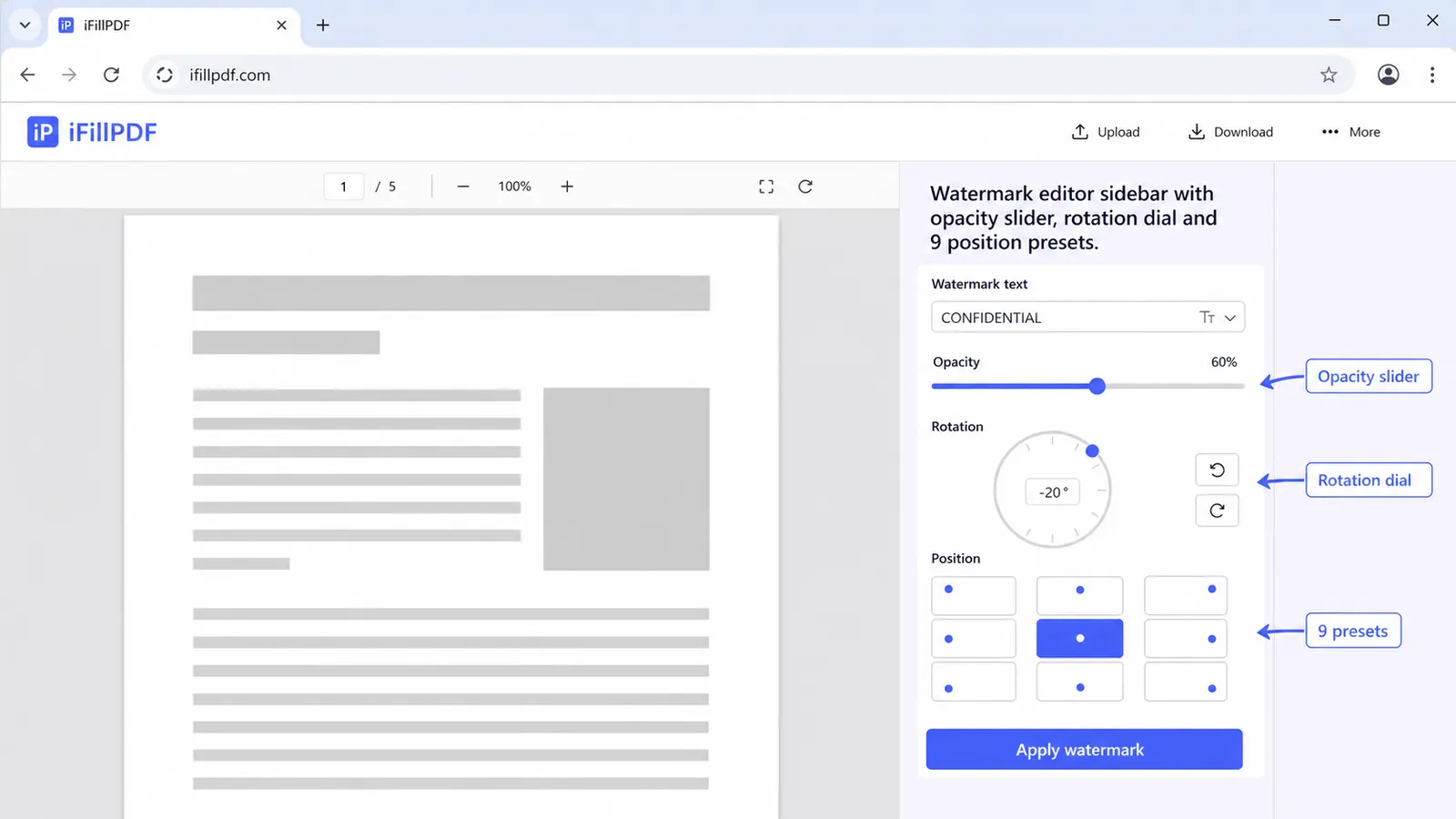
iFillPDF stamps a text watermark — your own wording, or one of the ready-made ones like Confidential and Draft — across every page of the document in one pass, with an opacity slider from 10 to 80% and a rotation dial covering the full circle. It does not do logo images. Processing happens client-side in your browser, so your file never crosses the Atlantic in the first place. There is no signup and no daily quota; files go through one at a time.
Smallpdf keeps image watermarks and batch on its Pro plan, and applies a daily limit on the free tier. iLovePDF offers image watermarks for free but caps batch processing behind Premium. PDF24 has a generous free tier with image support. Sejda caps at 3 documents per day and 200 pages per file before requiring a paid plan.
Method 2 — Adobe Acrobat Pro Watermark
If you already subscribe to Acrobat Pro, the built-in watermark is the most thorough. Open your PDF, go to Tools > Edit PDF > Watermark > Add, then enter your text or browse for an image file. Acrobat exposes font, color, rotation in fixed degrees (45°, -45°, custom), opacity slider, position with X/Y offset from any of the 9 anchor points, and page range so you can skip the cover page. You can also save the watermark as a preset and reapply it to future documents in one click — that reusability is the thing free browser tools do not replicate.
Acrobat is overkill if watermarking is your only need. For occasional one-off documents, the free online tools above ship the same result in 30 seconds without a subscription.
Method 3 — Mac Preview annotations (basic)
macOS Preview can stamp text on a PDF for free but it is not a true watermark — the text sits as a single annotation on a single page, not as a repeating overlay across every page. To use it: open your PDF in Preview, click Tools > Annotate > Text, type your label, then drag to position and adjust font size and color via the A icon. To replicate across pages, you have to copy the annotation manually onto each page (tedious past 5 pages).
This works for a quick "Draft" mark on a single-page invoice but fails for multi-page contracts, branded reports, or anything requiring controlled opacity. Use the online tools above instead for documents larger than 2 pages.
Method 4 — pdftk + ImageMagick CLI (advanced)
Developers and ops teams who need to watermark hundreds of PDFs nightly should script it. Combine pdftk for stamping with ImageMagick for generating the watermark layer. Generate a transparent PNG with your text, convert to a single-page PDF, then stamp every page of the source:
convert -size 1600x900 xc:none -fill "rgba(180,0,0,0.25)" \
  -pointsize 120 -gravity center -draw "rotate -30 text 0,0 'CONFIDENTIAL'" \
  watermark.png

convert watermark.png watermark.pdf

pdftk source.pdf stamp watermark.pdf output stamped.pdf
Drop this in a cron job or a Vercel cron route and you have a free, scriptable, repeatable watermark pipeline. The trade-off: zero UI, you tune coordinates by hand, and previewing a single tweak takes a full re-render.

How to remove a watermark
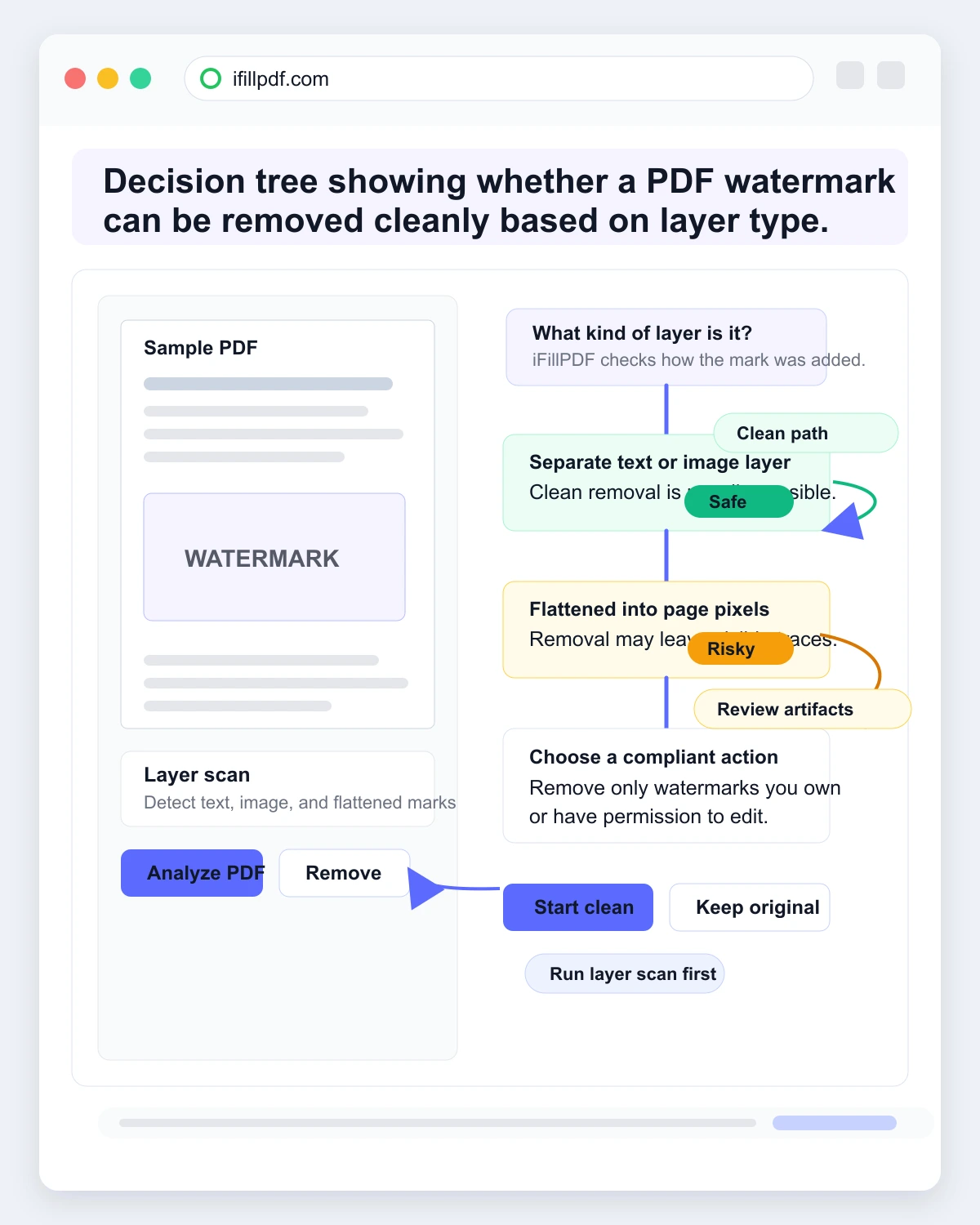
Removing a watermark is harder than adding one, and difficulty depends on how the original was applied. If the watermark was added as a true PDF text or image layer (not flattened), most editors can delete it in seconds via Edit PDF > select watermark > Delete, including iFillPDF Edit PDF. If the watermark was flattened into the page raster (common with scanned exports or PDFs printed-then-rescanned), removal requires OCR + image inpainting and rarely produces a clean result.
Note: removing a watermark from a document you do not own or have rights to is likely a copyright violation. Stick to watermarks on your own files (drafts you previously stamped, branded templates you want to repurpose).
FAQ
Can I watermark a PDF without Adobe? Yes. iFillPDF Watermark PDF, Smallpdf, iLovePDF, PDF24 and Sejda all add text or image watermarks for free in your browser, with no Acrobat subscription required.
How do I add a "Draft" or "Confidential" watermark? Open a watermark tool, type the word in the text field, set the rotation to around -45° and the opacity low enough to read the page through it, and apply to all pages. Diagonal placement across the middle of the page is the usual convention for draft and confidential markings.
Can I watermark with a logo image? Yes, with the right tool. iLovePDF, PDF24 and Sejda support PNG and JPG image watermarks on the free tier; Smallpdf restricts them to its Pro plan; iFillPDF stamps text only. Use a transparent PNG for the cleanest result.
How do I batch watermark multiple PDFs? PDF24 processes multiple files for free in one session; iLovePDF and Smallpdf gate batch behind Premium; iFillPDF handles one file at a time (every page of it in one click). For automated pipelines, use the pdftk + ImageMagick CLI script above.
Free vs paid watermark tools — what is the real difference? Free tools cover the ordinary cases: text, opacity, rotation, all pages at once, and image watermarks on several of them. Paid tools (Acrobat Pro, Smallpdf Pro) add reusable presets, page-range targeting, dynamic fields like recipient name + timestamp, and no daily quota. Pay only if watermarking is a recurring part of your week rather than a one-off.
Ship branded PDFs in 30 seconds
Add your watermark for free with iFillPDF — your text, your opacity, your angle, every page in one click. No signup, EU hosting in Frankfurt, and the file itself is processed in your browser rather than uploaded. Need more? Fill, sign, edit or merge your PDFs in the same session.