Fill out a W-9 online — free fillable IRS Form W-9
Fill out the IRS Form W-9 (Rev. 03/2024) online free — type your TIN, pick your tax classification, sign, download. No IRS filing: you give it to the requester.
How it works
Open the fillable IRS Form W-9
Load the official IRS Form W-9 (Rev. March 2024) in your browser — no need to download the raw irs.gov/pub/irs-pdf/fw9.pdf and print it.…
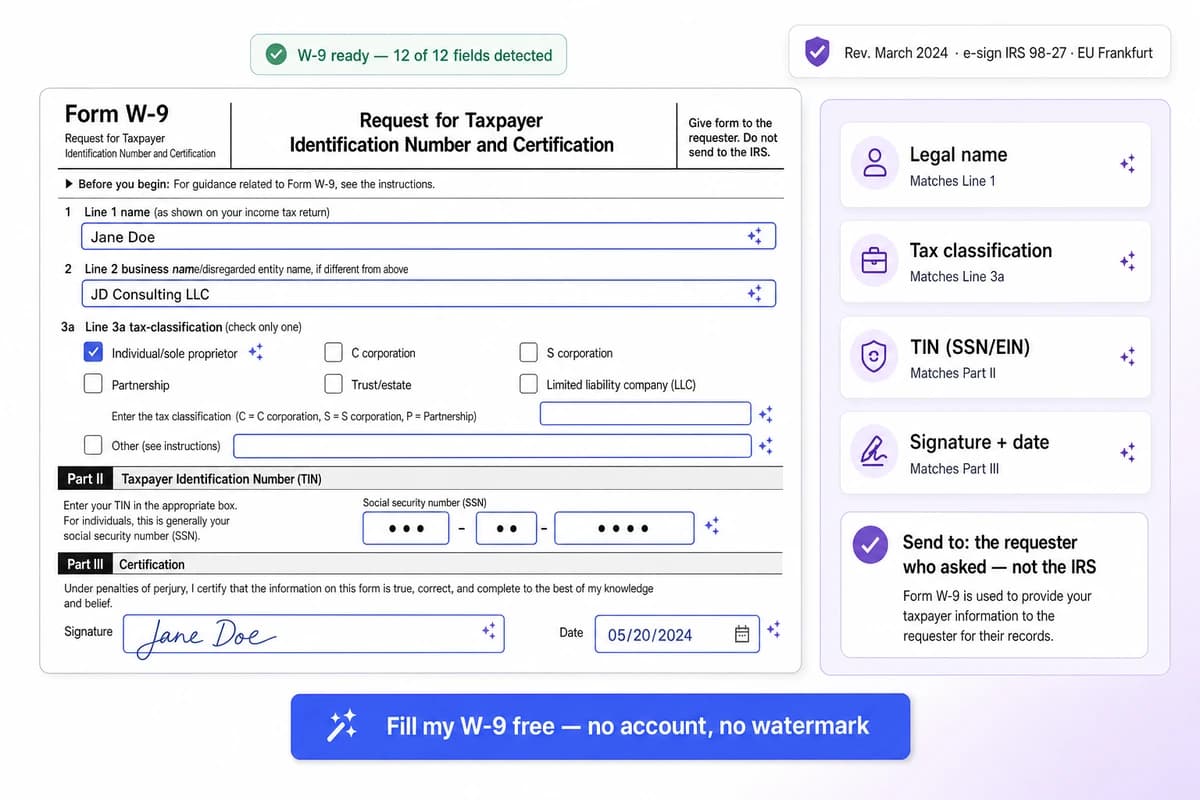
Type your details, pick your classification, sign
Enter your legal name exactly as it appears on your income tax return (this must match IRS records or the payer can get a CP2100 notice and start backup withholding), add a trade name or LLC…
Download and send it to whoever requested it
Export a flattened, print-ready PDF and send it back to the requester — your client, the business that hired you, your bank, or your property manager.…
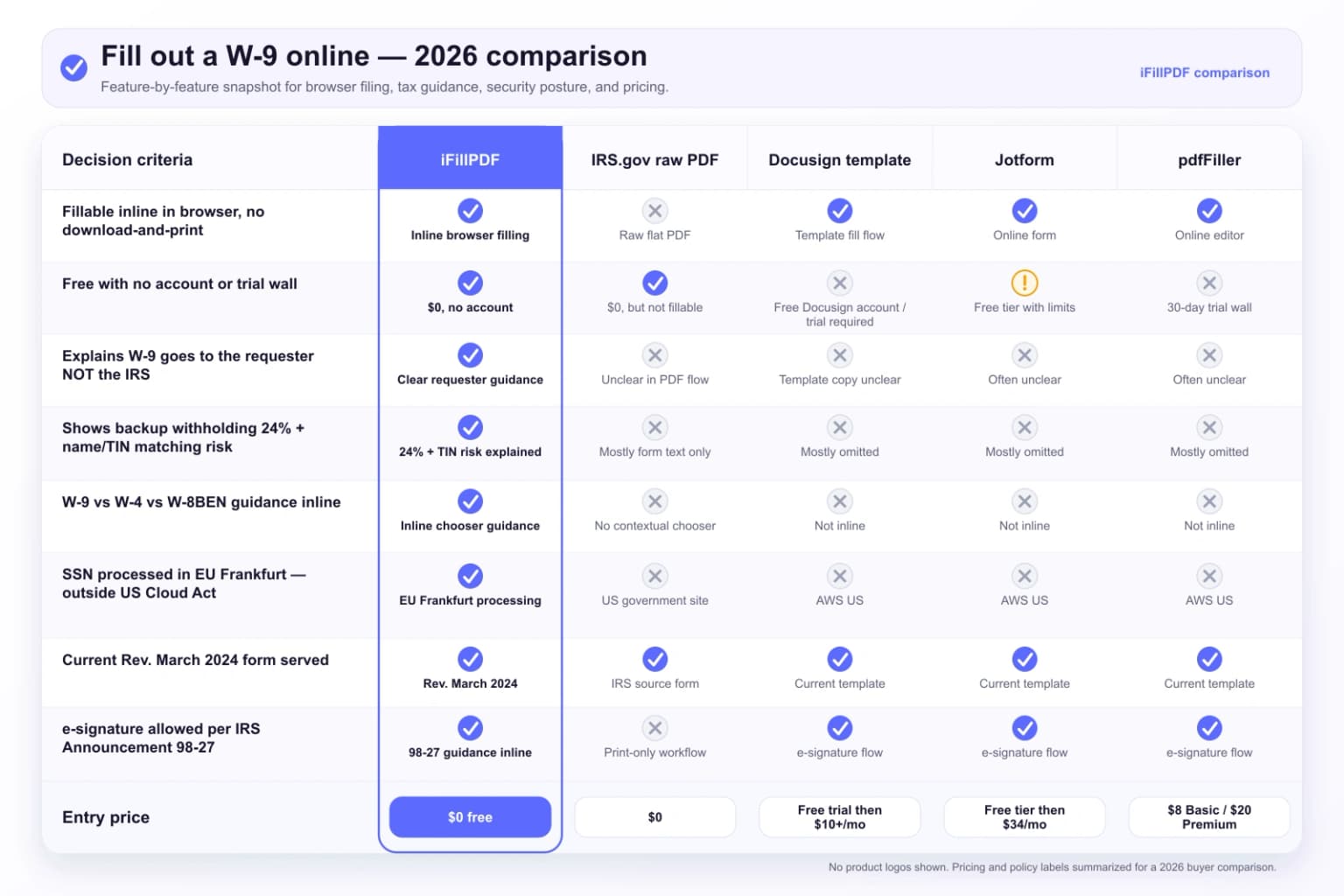
Why choose iFillPDF
The W-9 goes to the requester, not the IRS — we get this right
The single most common W-9 misconception online is that you "file your W-9 with the IRS." You do not. Form W-9 is a request from a payer to you; once completed it is handed back to that requester — the client, vendor manager,…
Backup withholding 24%, name/TIN matching, and the perjury certification — explained inline
A W-9 exists mainly to stop backup withholding. If the requester does not have a valid, signed W-9 with a correct Taxpayer Identification Number, the IRS requires them to withhold a flat 24% of your payments (26 U.S.…
W-9 vs W-4 vs W-8BEN — fill out the right form
A W-9 is for US persons (US citizens, resident aliens, US LLCs, US corporations) who are independent contractors, freelancers, vendors or other non-employees.…
Your SSN never leaves the EU — Frankfurt hosting, no Cloud Act reach
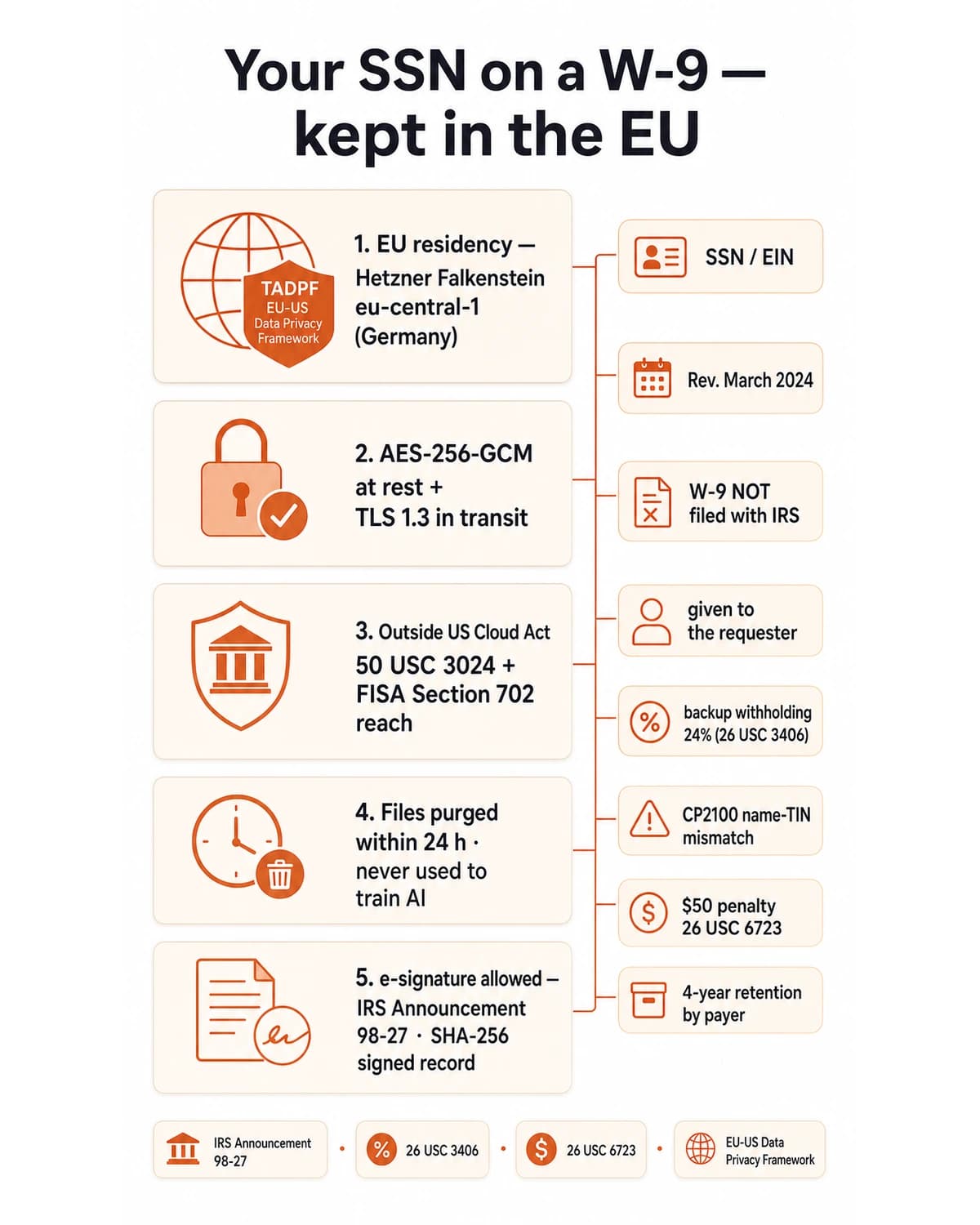
A W-9 contains your Social Security Number or EIN — exactly the data you do not want sitting in a US cloud subject to subpoena. iFillPDF processes and (optionally) stores your W-9 on Hetzner Falkenstein eu-central-1 in Germany,…
Technical details
Complete the official IRS Form W-9, Request for Taxpayer Identification Number and Certification (Rev. March 2024 — the current version for all succeeding tax years), directly in your browser: type your legal name on Line 1, your business or disregarded-entity name on Line 2, check your federal tax classification on Line 3a (individual/sole proprietor, single-member LLC, C corporation, S corporation, partnership, trust/estate, or LLC taxed as C/S/P), enter your address, drop in your SSN or EIN in Part II, then sign and date the Part III certification under penalty of perjury. Critically — and unlike what most websites imply — you do NOT file a W-9 with the IRS. You give the completed form to the requester (the client, payer, bank or property manager who asked for it), who keeps it on file to issue your Form 1099-NEC at year-end and to avoid the 24% backup withholding the IRS requires when no valid TIN is on record. iFillPDF auto-detects every field on the flat IRS PDF in ~600 ms, lets you e-sign it (electronic W-9 signatures are explicitly permitted by IRS Announcement 98-27), and exports a clean, flattened PDF — all processed on EU servers in Frankfurt under the EU-US Data Privacy Framework, so the Social Security Number you type never lands in a US datacenter within Cloud Act reach. No account needed and no Docusign-style trial wall — the free version adds a watermark, removed on paid plans.
Previews and proof
Go further with lifetime access
E-signature proof log, business templates, no watermark. $8.99, one payment, for life — no subscription.
Frequently asked questions
Do I file my W-9 with the IRS after filling it out?+
No. You never file a W-9 with the IRS. The form is a request from a payer to you, so once you complete and sign it you send it back to whoever asked for it — your client, the business that hired you, your bank, your brokerage, or your property manager. They keep it on file (usually for about 4 years) and use the Taxpayer Identification Number on it to prepare your year-end information return, such as a Form 1099-NEC. The IRS only ever sees the resulting 1099, not your W-9.
Is it really free to fill out a W-9 online with iFillPDF?+
Yes. You can fill out the official IRS Form W-9 (Rev. March 2024), type your TIN, pick your tax classification, sign and download a flattened PDF for free, with no credit card; the free version adds a watermark, removed on paid plans. There is no Docusign-style 30-day trial wall and no forced account just to access the form. iFillPDF runs 100% in your browser for this form, and your SSN is processed on EU servers in Frankfurt — not a US datacenter.
How do I fill out a W-9 as an independent contractor or freelancer?+
Enter your personal legal name on Line 1 (as it appears on your income tax return). Leave Line 2 blank unless you operate under a registered trade name (DBA), in which case put that on Line 2. Check "Individual/sole proprietor or single-member LLC" as your federal tax classification on Line 3a. Enter your address. In Part II, provide your Social Security Number — or your EIN if you have obtained one. Then sign and date Part III. Even if you invoice under a business name, the IRS matches reporting to the legal name on Line 1.
How do I fill out a W-9 for an LLC?+
It depends on how your LLC is taxed, not how it is registered with your state. For a single-member LLC treated as a disregarded entity (the default), enter the owner's legal name on Line 1, the LLC name on Line 2, check "Individual/sole proprietor or single-member LLC," and provide the owner's SSN or the LLC's EIN. For a multi-member LLC taxed as a partnership, put the LLC's registered name on Line 1, check the LLC box and enter "P" for partnership, and provide the LLC's EIN. If the LLC elected C- or S-corporation taxation, check LLC and enter "C" or "S" and use the corporate EIN. Picking the wrong classification is one of the most common W-9 errors.
What is backup withholding and how does a W-9 avoid it?+
Backup withholding is a flat 24% the IRS requires a payer to hold back from your payments and send to the IRS when there is no valid, signed W-9 with a correct TIN on file (26 U.S. Code §3406). It also kicks in if the name and TIN you give do not match IRS records — the payer receives a CP2100 or CP2100A notice and may start withholding until you correct it. Providing an accurate, signed W-9 is how you tell the payer no backup withholding is needed, so you get paid in full.
What is the difference between a W-9 and a W-4?+
A W-9 is for non-employees — independent contractors, freelancers, vendors and consultants — and simply gives a payer your TIN so they can report payments to you on a 1099. A W-4 (Employee's Withholding Certificate) is for employees and tells your employer how much federal income tax to withhold from each paycheck. A W-9 does not adjust any withholding. If a company treats you as an employee, you complete a W-4; if it treats you as a contractor, you complete a W-9.
I am not a US person — should I fill out a W-9?+
No. A W-9 is only for US persons (US citizens, resident aliens, and US entities such as US LLCs and corporations). If you are a foreign individual or non-resident alien, you give the payer a Form W-8BEN instead; foreign entities use Form W-8BEN-E. These forms certify your non-US status and let you claim any tax-treaty benefits. Filling out a W-9 when you should use a W-8BEN can cause incorrect reporting and withholding, so confirm your status first.
Can I sign a W-9 electronically, and is that legally valid?+
Yes. The IRS explicitly permits electronic completion and signature of Form W-9 under IRS Announcement 98-27, as long as the electronic system preserves the exact information the paper form would contain, identifies and authenticates the signer, keeps the perjury statement, and lets the payer produce a hard copy if the IRS asks. iFillPDF meets these conditions — you can draw, type or upload your signature, and we keep a SHA-256 record of the signed document. A W-9 does not require a wet-ink signature.
Which version of Form W-9 should I use in 2026?+
Use the IRS Form W-9 marked Rev. March 2024. That is the most recent revision the IRS issued and it remains the current version for all succeeding tax years, so it is the right one to use in 2026. iFillPDF always serves the current Rev. 03/2024 form, so you never submit an outdated version — submitting an old revision is a common reason a requester asks you to redo the form.
Is my Social Security Number safe when I fill out a W-9 here?+
Yes. Your W-9 — including your SSN or EIN — is processed on Hetzner Falkenstein eu-central-1 in Germany, under the EU-US Data Privacy Framework, which keeps your data outside the reach of the US Cloud Act 50 U.S. Code §3024 and FISA Section 702. We use AES-256-GCM encryption at rest, TLS 1.3 in transit, purge files within 24 hours, and never use your document to train AI. By contrast, common US-based W-9 tools route your SSN through AWS US infrastructure. When you send the completed W-9 to a requester, use a secure channel rather than plain email.
More PDF tools
Keep going with a related tool — try without signing up, free account to download.