Remove Text From a PDF
Remove text from any PDF free, no sign-up to start. iFillPDF's AI eraser truly deletes the text and rebuilds the background — not a white box on top. GDPR, EU servers.
How it works
Upload your PDF
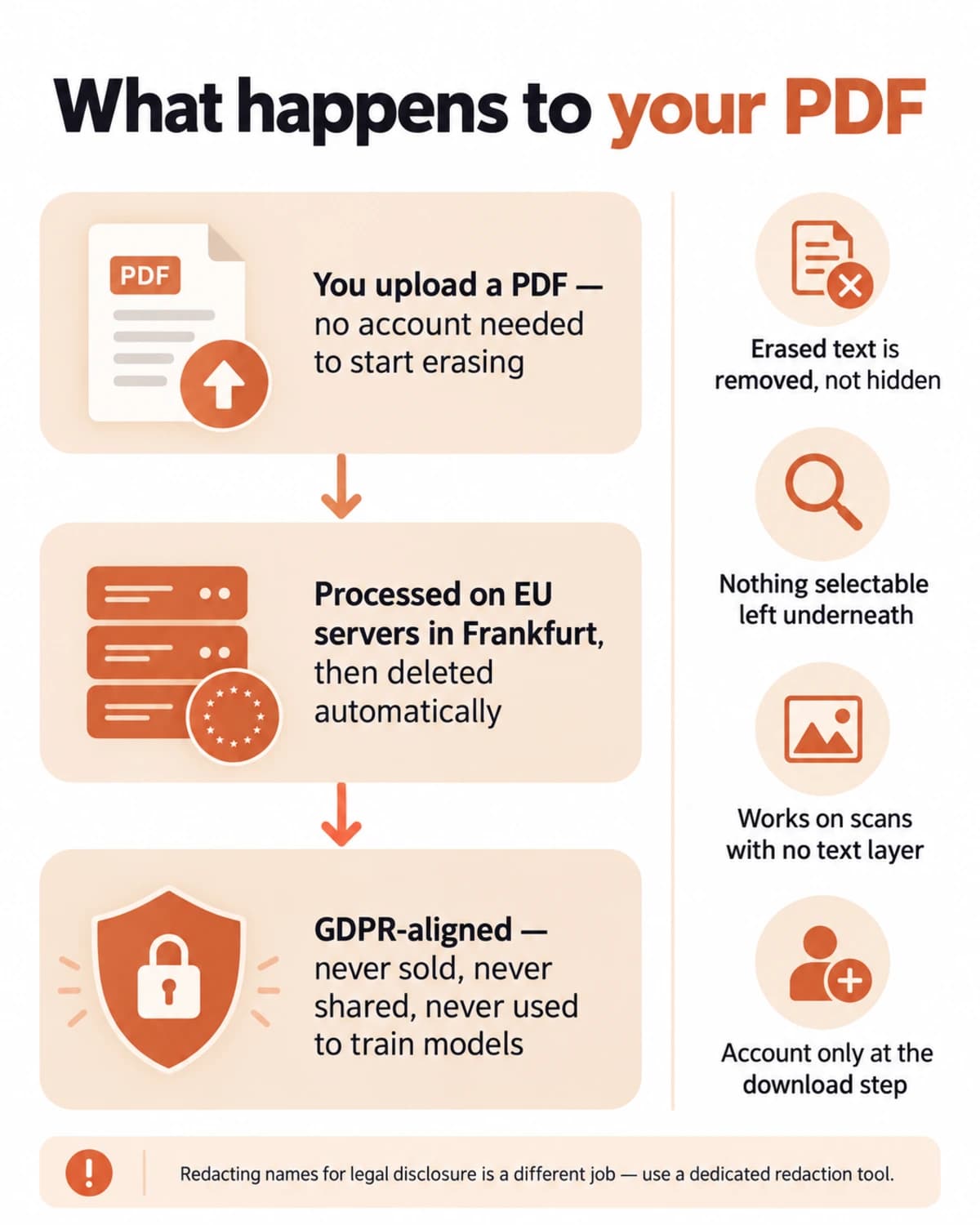
Drag and drop your file or pick it from your device. No account, no email, no install — your document opens straight in the browser editor on desktop or mobile.
Erase the text
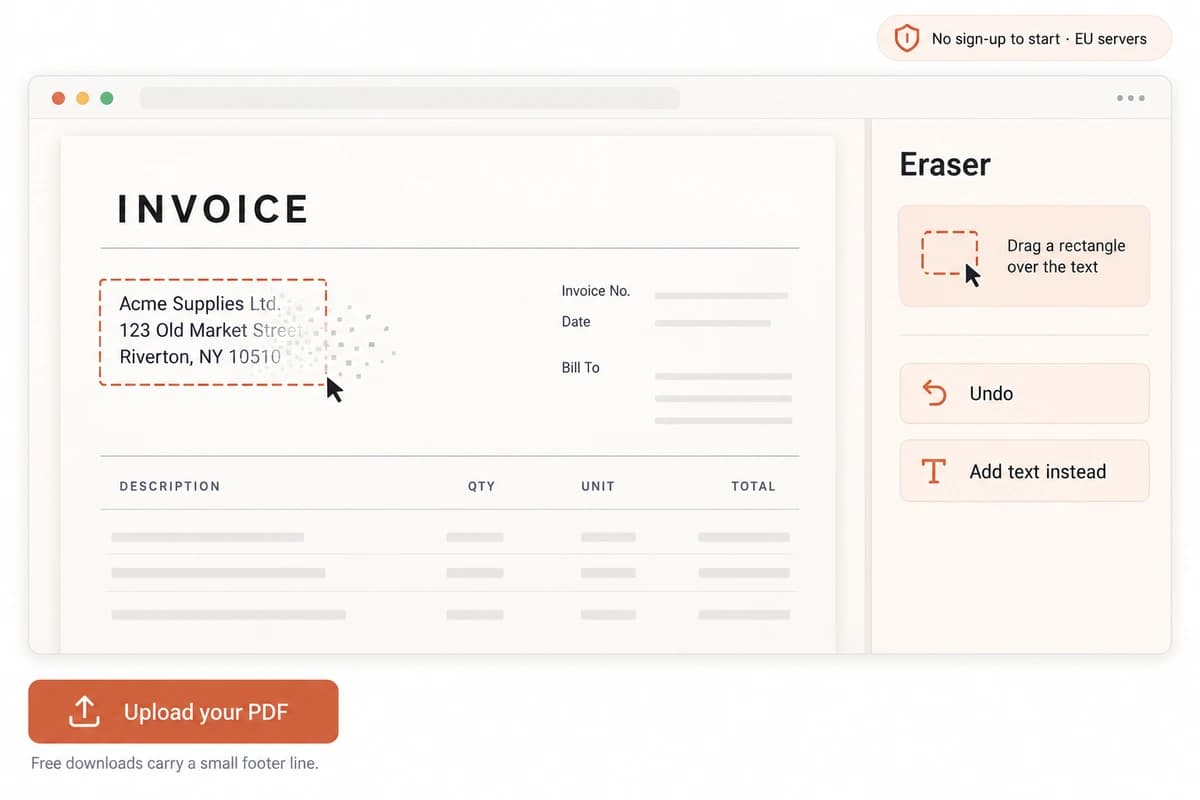
Drag a rectangle over the words you want gone. The AI eraser deletes the text and rebuilds the paper, color and texture behind it — so nothing is left selectable or copyable underneath a…
Download the clean PDF
Export your edited PDF in one click with the original layout intact. Downloading is where a free account comes in, and files exported on the free plan carry a small footer line.…
Why choose iFillPDF
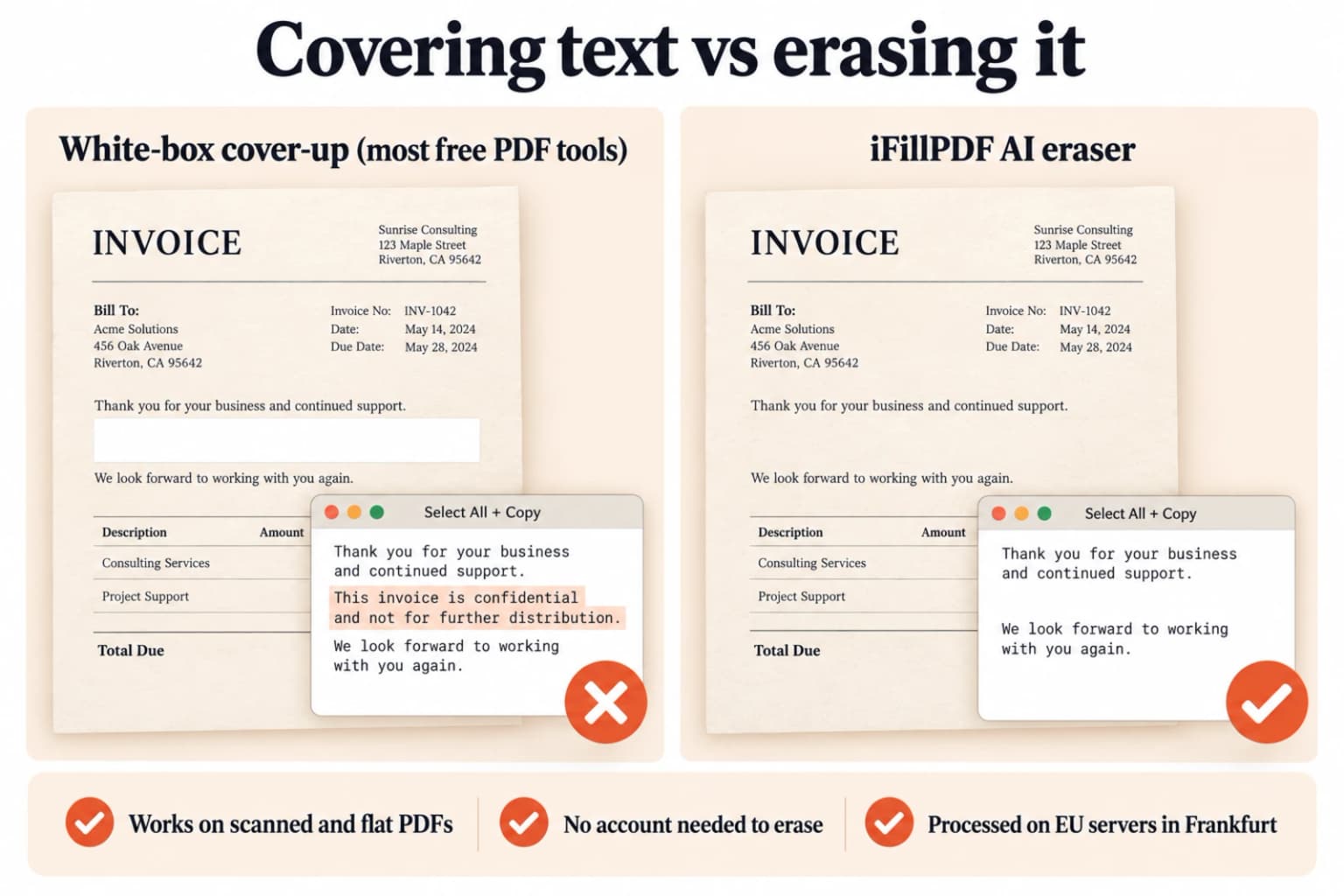
True AI erase, not a white box
Most free tools only cover text with a white rectangle — copy the page and the words reappear. The AI deletes the characters and inpaints the background, so removed text can't be selected, copied or recovered.
Works on scanned PDFs and images
Erase text from scans, photos and flattened PDFs that have no editable text layer. The AI reconstructs the background behind whatever you remove, no OCR step or conversion needed first.
No sign-up to start
Upload and start erasing instantly in your browser on Windows, Mac, iPhone or Android — no account to create, no software to download, no email required. A free account is only asked for when you download the finished file.
Private by design, EU hosting
Your file is processed on European servers in Frankfurt and deleted automatically after processing. GDPR-aligned — your document is never sold or shared.
Keep editing in one place
After erasing, add new text, fill in blanks, white out more or sign — all in the same editor. No exporting and re-uploading between three different websites.
Free to use
Remove text from your PDF for free, without a daily file cap that forces you to upgrade halfway through the job. Free downloads carry a discreet footer line; a single one-time payment removes it for good.
Technical details
Delete unwanted text from any PDF in seconds — free, and with no sign-up to start. Most online tools just drop a white rectangle on top, so the words stay selectable and copyable underneath. iFillPDF's AI eraser actually removes the characters and reconstructs the background behind them, so nothing stays hidden. Files are processed on EU servers in Frankfurt and deleted automatically.
Previews and proof
Go further with lifetime access
E-signature proof log, business templates, no watermark. $8.99, one payment, for life — no subscription.
Frequently asked questions
How do I remove text from a PDF for free?+
Upload your PDF to iFillPDF, drag a rectangle over the text you want to remove, and download the cleaned file — free, and with no account needed to erase. The AI eraser deletes the words and rebuilds the background, instead of just hiding them behind a white shape. You only sign up when you download, and free exports carry a small footer line.
What's the difference between erasing text and whiting it out?+
Whiting out places a white rectangle over the text, so the words stay in the file and can still be selected or copied. Erasing with iFillPDF's AI actually removes the characters and reconstructs the background — there is nothing left underneath.
Can I remove text from a scanned PDF?+
Yes. Because the AI eraser works on the page image and rebuilds the background, it removes text from scanned PDFs, photos and flattened documents where there is no editable text layer — no OCR or conversion needed first.
Can I remove handwritten text from a PDF?+
Yes. Drag a rectangle over the handwritten note, signature mark or annotation and the AI erases it and reconstructs the paper behind it, the same way it handles printed text.
Will the removed text still be hidden somewhere in the file?+
No. The text is deleted from the page and the background is rebuilt over it, so removed words can't be selected, copied or pulled back out of the document. (For blacking out names or numbers for legal disclosure, use a dedicated redaction tool.)
Do I need to create an account or install software?+
Nothing to install, and nothing to sign up for in order to erase: open the page, upload your PDF and start erasing on Windows, Mac, iPhone or Android. A free account is only required when you download the result — that step also lets us keep your file.
Is my document safe and private?+
Yes. Files are processed on EU servers in Frankfurt, deleted automatically after processing, and never shared or sold. The whole workflow is GDPR-aligned.
More PDF tools
Keep going with a related tool — try without signing up, free account to download.